
Neobile LLC · iOS 26.1 or later
Alarm Pro: Flexible Alarms
Alarm Pro: Flexible Alarms is an iPhone and iPad alarm app for schedules that don’t repeat weekly: every 2 weeks, every month, every N days or years, or one exact date. Alarms are real system alarms that ring with the app closed. Free to download; unlimited advanced alarms, extra sounds and Snooze All need an in-app purchase.
Free to download · iPhone and iPad · iOS 26.1 or later
Current version 1.6 · October 8, 2026
Inside the app
Who is it for?
- People on a two-week rhythm: paydays, custody handovers, recycling pickup, a class every other Saturday.
- Anyone with monthly dates: rent on the 1st, a bill, a monthly medication or check-in.
- Shift workers whose rotation repeats every few days instead of every week.
- Heavy sleepers who need a small task, not a button, to turn the alarm off.
- Families and housemates who want to send each other the same alarm, already set up.
What does it do?
Repeat rules the Clock app doesn’t have
- Every day, weekdays, chosen days of the week or every week.
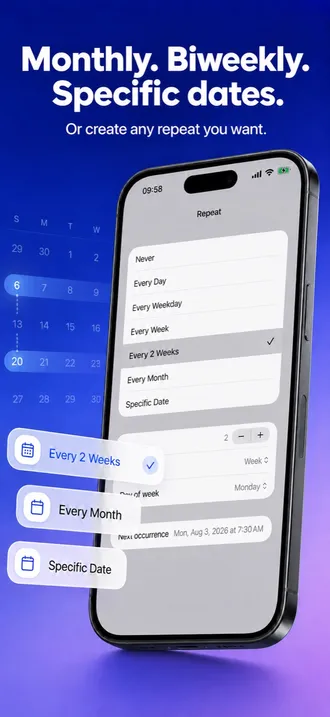
- Every 2 weeks, with a Next occurrence picker that lets you choose which alternate week starts the pattern.
- Every N days, weeks, months or years (N from 1 to 99) on a weekday, a day of the month or a date each year.
- Specific Date: one alarm on any day from today on.
- End rules: stop after a number of weeks (up to 52) or a number of rings (up to 200); the last occurrence is shown before you save.
- A monthly alarm set for the 29th, 30th or 31st rings on the last day of shorter months instead of skipping them.
Change one ring, keep the schedule
- Skip once (new in 1.6): swipe right on a repeating alarm to skip just its next ring; Undo brings it back.
- Skip a later ring from the calendar’s day view while the next one still rings.
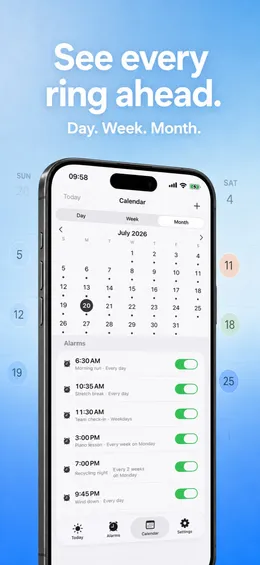
- A calendar with day, week and month views that shows every upcoming ring.
- Apple Calendar overlay: your events next to your alarms, read-only, on this device.
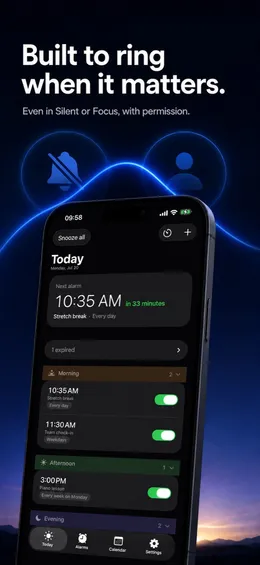
- A calm Today view with your next alarm and the day’s timeline.
Getting up
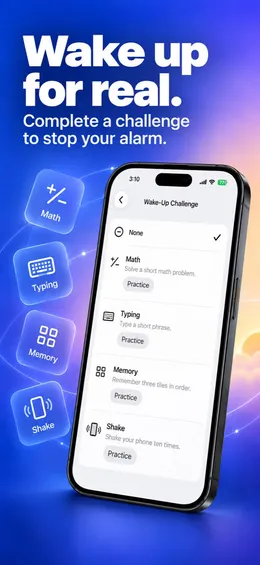
- Wake-Up Challenge: Math, Typing, Memory or Shake must be completed before the alarm stops.
- Practice each challenge first; practice mode never rings.
- With alarm permission, alarms sound even in Silent mode or during a Focus.
- Original alarm sounds and a snooze length you choose.
Moving in, sharing, keeping order
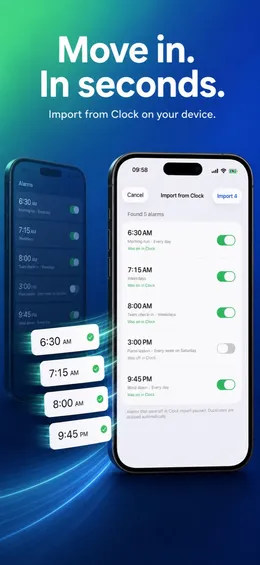
- Import from Clock: select screenshots of your Clock alarm list; Alarm Pro reads the times, labels, repeat days and on/off states on the device.
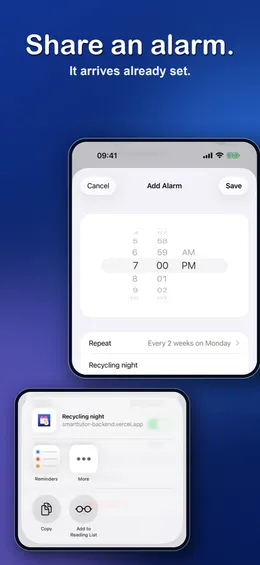
- Share an alarm as a link; it arrives already set, schedule included.
- Search, filters and morning / afternoon / evening groups for long alarm lists.
- Small, medium and large Home Screen widgets, light and dark looks, a full iPad layout.
What makes it different?
Real system alarms
Alarm Pro is built on Apple’s system alarm framework (AlarmKit), so alarms ring when the app is closed. You never need to keep it open in the background.
You choose the week
An every-2-weeks or every-3-months rule can start in more than one period. Alarm Pro lists the possible next dates and you pick the right one, so the alarm follows your alternate week, not whichever week you happened to save it in.
Private by design
No account, no tracking, no data collection. Alarms and the screenshots you import never leave your device.
One ring, not the whole series
Skip once removes a single upcoming ring and leaves the rest of the schedule untouched, so there is nothing to remember to switch back on.
What is free and what is paid?
Free
- Unlimited one-time alarms and alarms that repeat on days of the week (every day, weekdays, chosen days, every week).
- One advanced alarm at a time: every 2 weeks, monthly, yearly, every N days, a specific date, an end rule or a Wake-Up Challenge. An alarm that has finished no longer counts.
- Skip once, the calendar, the Apple Calendar overlay, Import from Clock and sharing alarms.
- Two alarm sounds, widgets, light and dark looks.
With an in-app purchase
- Unlimited advanced alarms.
- Seven extra alarm sounds, plus your own sound.
- Snooze All: pause every alarm for a chosen time with one tap.
- Delete all expired alarms at once.
- One in-app purchase covers all of these: monthly, yearly or one-time.
Requirements
- iPhone
- iOS 26.1 or later
- iPad
- iPadOS 26.1 or later, with a full iPad layout
- Mac
- macOS 26.1 or later on a Mac with Apple M1 or later (as listed on the App Store)
- Languages
- 18: English, Arabic, Dutch, French, German, Indonesian, Italian, Japanese, Korean, Polish, Portuguese, Russian, Simplified Chinese, Spanish, Thai, Traditional Chinese, Turkish, Vietnamese
- Account
- None. Alarm permission is required; Calendar access only if you turn on the overlay.
- Current version
- 1.6 · October 8, 2026
Questions people ask
Can the iPhone Clock app set an alarm every other week or every month?
No. Apple’s iPhone User Guide for iOS 26 says Clock alarms repeat on the days of the week you choose, so every repeat is weekly. Alarm Pro adds every 2 weeks, every month, every N days, weeks, months or years, and alarms on one specific date. (Since iOS 26, Apple’s Reminders app can also give an alarm for a reminder marked Urgent.)
Does the alarm ring if Alarm Pro is closed?
Yes. Alarm Pro sets real system alarms, so they ring with the app closed. With alarm permission they also sound in Silent mode and during a Focus.
Is Alarm Pro free?
It is free to download. One-time alarms and weekday repeats are unlimited, and you can keep one advanced alarm (such as every 2 weeks, monthly, a specific date or a Wake-Up Challenge) at a time. Unlimited advanced alarms, extra sounds, your own sound and Snooze All need one in-app purchase.
How do I skip only the next alarm?
Swipe right on a repeating alarm and tap Skip. Only that ring is skipped; the row shows “Skipped” with the next date, and Undo restores it. The rest of the schedule stays as it is.
Can I bring my alarms over from the Clock app?
Yes. Take screenshots of your Clock alarm list, then choose Import from Clock and select them. Alarm Pro reads the times, labels, repeat days and on/off states on the device; the screenshots are not uploaded.
Can I send an alarm to someone else?
Yes. Share an alarm as a link. When the other person opens it in Alarm Pro, the alarm arrives already set, with its time, label and repeat rule.
Does Alarm Pro collect my data?
No. There is no account, no tracking and no data collection. Alarms, imported screenshots and the Calendar overlay stay on your device.
Free tools and guides
- Flexible Alarms for iPhone: Monthly, Biweekly, and Wake-Up Challenge
- How to Set an Alarm for a Specific Date on iPhone
- How to Set an Alarm Every 2, 3 or N Days on iPhone
- How to Skip Just the Next Alarm on iPhone
- A Math Alarm for Heavy Sleepers on iPhone
- How to Set an Every Other Week Alarm on iPhone
- How to Set a Monthly Alarm on iPhone
- How it compares with other apps


