Every other day, every 3 days, shift cycles
How to set an alarm every few days on iPhone
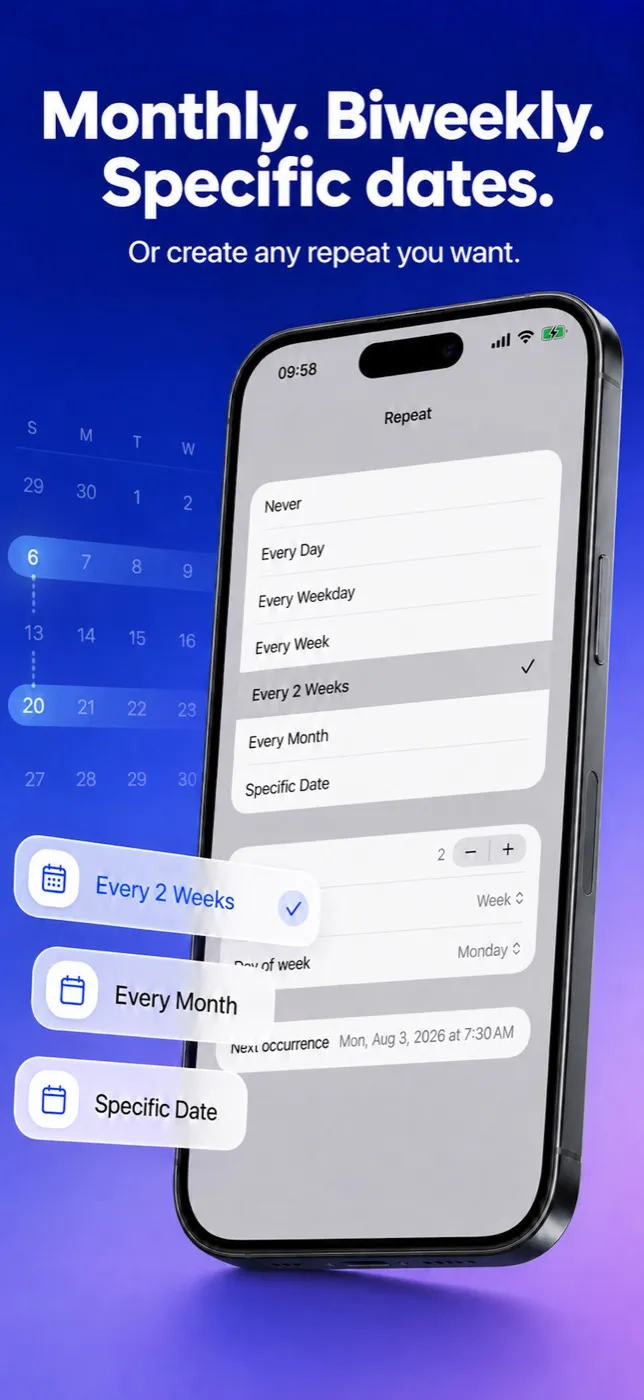
Clock repeats an alarm on chosen weekdays, so any rhythm that isn’t seven days long falls apart. Alarm Pro repeats every N days, weeks, months or years (N from 1 to 99): open Repeat, choose Every Week, set Every to the number of days and Unit to Day, pick the starting day under Next occurrence, and save.
Clock facts from Apple’s iPhone User Guide for iOS 26, checked October 11, 2026; the current iOS 27 edition says the same. Alarm Pro needs iOS 26.1 or later.
Free to download and use · Advanced features available with in-app purchases
01 / The limit of a weekday repeat
Can the iPhone Clock app repeat an alarm every 2 or 3 days?
No. In Apple’s guide the Repeat option means one thing: Choose the days of the week you want the alarm to repeat.
[1] Every Clock repeat is therefore a weekly pattern. That is fine for weekdays or gym on Tuesday and Thursday, and useless for rhythms of a different length.
Take every other day. Starting on a Monday it rings Monday, Wednesday, Friday, Sunday — then Tuesday, Thursday, Saturday the following week. Every three days drifts the same way and only repeats its weekday pattern after 21 days. No set of weekday alarms follows that, and switching alarms on and off by hand is exactly the chore people try to escape. Apple’s current iOS 27 page still describes only weekday repeats.[2]
Outside Clock, iOS 26 does offer one built-in route. In Reminders you can give a reminder a time, tap Repeat and choose the frequency, and turn on Urgent, which Apple says gets you an alarm when the reminder is due
.[3] If a repeating to-do with an alarm attached covers your need, try it first. Alarm Pro is the alarm-app answer: the interval, its start day and its end are set in one Repeat screen, every ring is visible in a calendar, and a single ring can be skipped without touching the rest.
| Rhythm | iPhone Clock app (iOS 26) | Alarm Pro 1.6 |
|---|---|---|
| Every day / chosen weekdays | Yes [1] | Yes |
| Every 2 or 3 days | No — weekday repeats only [1] | Yes — Every 2 or 3, Unit Day |
| Every 2, 3 or 4 weeks | No [1] | Yes — Unit Week, on a chosen weekday |
| Every 3 or 6 months | No [1] | Yes — Unit Month, on a day of the month |
| Choose which day the cycle starts | Not applicable | Yes — Next occurrence lists the possible first dates |
| Stop after a number of rings | No — turn it off by hand [1] | Yes — End after, up to 200 times |
02 / Step by step
How do I set an every-N-days alarm in Alarm Pro?
- Add an alarm. Tap +, set the time and add a label such as “Water the seedlings”.
- Open Repeat and choose Every Week. Every Week, Every 2 Weeks and Every Month all open the same interval editor underneath the list.
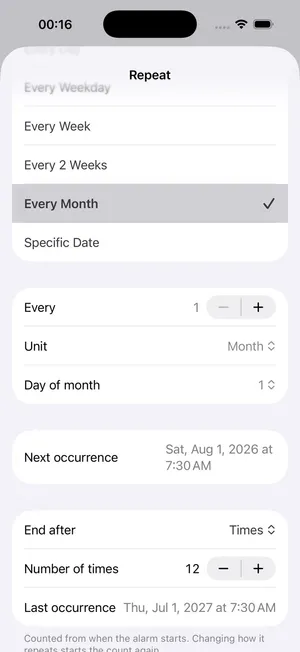
- Set the interval. Use the Every stepper for the number (1 to 99) and set Unit to Day. Every 2 and Day is every other day; Every 3 and Day is every third day.
- Pick the first day. An every-3-days rule could start today, tomorrow or the day after, so Next occurrence lists those dates and you tap the right one. That choice fixes the whole pattern.
- Save. The Calendar tab now shows the alarm on every matching day, which is the quickest way to confirm the rhythm.
The same editor works with other units. Unit Week plus a Day of week gives every 3 or 4 weeks on, say, a Thursday; Unit Month plus a Day of month gives quarterly or twice-yearly alarms; Unit Year gives one date each year.
03 / Shift work
Can it follow a rotation like four days on, four days off?
A 4-on/4-off pattern repeats every eight days, and you work on four of them. Build it from four alarms, each set to Every 8 with Unit Day, and give them four consecutive first days under Next occurrence. From then on, each cycle rings on your four working mornings and stays quiet on your four days off, with no weekly re-shuffling. Any rotation that repeats on a fixed number of days can be split the same way: one alarm for each working day of the cycle.
04 / A clear finish
How do I make an every-few-days alarm stop on its own?
Below the interval editor, set End after to Times and enter how many rings you need, up to 200. Last occurrence then shows the final date, so a course of ten reminders every three days ends where you expect. The count starts when you save the rule; changing how it repeats starts it again.
05 / Free or paid
Do I have to pay for an every-few-days alarm?
No for one, yes for many. Every 1 day and every 1 week behave like ordinary daily and weekly alarms and are unlimited for everyone. An interval of 2 days or more is an advanced alarm, and the free version runs one advanced alarm at a time. The shift-rotation setup above uses four, so it needs the in-app purchase, which also brings seven extra alarm sounds, your own sound and Snooze All.
Alarm Pro: Flexible Alarms
Every N days, weeks, months or years
Pick the start day, see the next ring, set an end, and let real system alarms do the rest — even with the app closed.
Free to download · iOS 26.1 or later
More Alarm Pro guides
Sources
Frequently asked questions
Every-few-days alarm questions
Can I make an iPhone alarm go off every other day?
Not with Clock, whose repeats are tied to weekdays; on iOS 26 a repeating Urgent reminder in Reminders is the built-in alternative. In Alarm Pro, choose Every Week in Repeat, set Every to 2 and Unit to Day, then pick which of the next two days starts the pattern.
Why can’t I fake an every-3-days alarm with several Clock alarms?
Because a three-day rhythm lands on a different weekday each time and only repeats its weekday pattern after 21 days. Weekday alarms would ring on the wrong days within the first week.
Can an every-few-days alarm stop by itself?
Yes. Turn on End after, choose Times and enter the number of rings, up to 200. Last occurrence shows the date of the final one before you save.
How do I cover a rotation like four days on, four days off?
Create four alarms that each repeat every 8 days and give them consecutive start days in Next occurrence. Together they ring on the four working days of every cycle. That needs more than one advanced alarm, which is part of the in-app purchase.
Will the alarm still ring if I don’t open the app for weeks?
Alarm Pro arms real system alarms ahead of time, and version 1.6 sets fixed-schedule alarms further ahead so they keep ringing even if the app is not opened for a while.
A repeating alarm is a reminder; follow your clinician’s instructions for any medication schedule. Alarm Pro comes from Neobile LLC, an independent developer with no affiliation to Apple Inc., which owns the iPhone and iOS trademarks.