Clock vs Alarm Pro · checked on iOS 26
How to set an alarm for a specific date on iPhone
The built-in Clock app can’t: its alarms have a time and weekdays, but no date. To ring on one exact day weeks or months away, create the alarm in Alarm Pro, open Repeat, choose Specific Date, pick the day, set the time and save. It is a real system alarm, so it rings with the app closed.
Sources: Apple’s iOS 26 iPhone User Guide, read on 11 October 2026 (the iOS 27 edition says the same). Since iOS 26 an Urgent reminder in Reminders can also ring; see below. Alarm Pro runs on iOS 26.1 or later.
Free to download and use · Advanced features available with in-app purchases
01 / The built-in option
Can the iPhone Clock app set an alarm for a specific date?
No. Apple’s iPhone User Guide describes Clock alarms as alarms that can be set for any time and repeated on specific days of the week
.[1] When you add one, the choices are Repeat, Label, Sound, Snooze and Snooze Duration. There is no field for a day of the month or a year, so a Clock alarm that does not repeat simply goes off the next time the clock reaches that time — later today or tomorrow, never on the 14th of next month.
A Calendar event with an alert set to At time of event
is the old workaround.[3] That alert is a notification, and Apple’s page on Silent mode says Silent mode silences notifications, while Clock alarms keep playing through the speaker.[2]
iOS 26 added a better built-in route: in Reminders, give the reminder a date and time and turn on Urgent, and Apple says you get an alarm when the reminder is due
.[4] Apple notes that Reminders features need updated reminders in iCloud. If one dated alarm inside your to-do list is all you need, that is a fair choice. Alarm Pro is for people who want dated alarms in an alarm app, next to their biweekly and monthly ones, on a calendar of every upcoming ring, with an optional Wake-Up Challenge and no account.
| What you need | iPhone Clock app (iOS 26) | Alarm Pro 1.6 |
|---|---|---|
| Pick a calendar date | No — a time plus days of the week [1] | Yes — Repeat › Specific Date, any day from today on |
| Ring weeks or months ahead | Only through a weekly repeat [1] | Yes, once, on the chosen day |
| Same date every year | No [1] | Yes — every 1 year on a chosen month and day |
| Sound with Silent mode on | Yes [2] | Yes, with alarm permission |
| See the alarm on a calendar | No date to show [1] | Day, week and month views |
| Snooze length | Snooze Duration per alarm [1] | One snooze length in Settings |
02 / In Alarm Pro
How do I set an alarm for one date in Alarm Pro?
- Create the alarm. Open Alarm Pro, tap +, set the time and give it a label you will recognise half-asleep, such as “Passport appointment”.
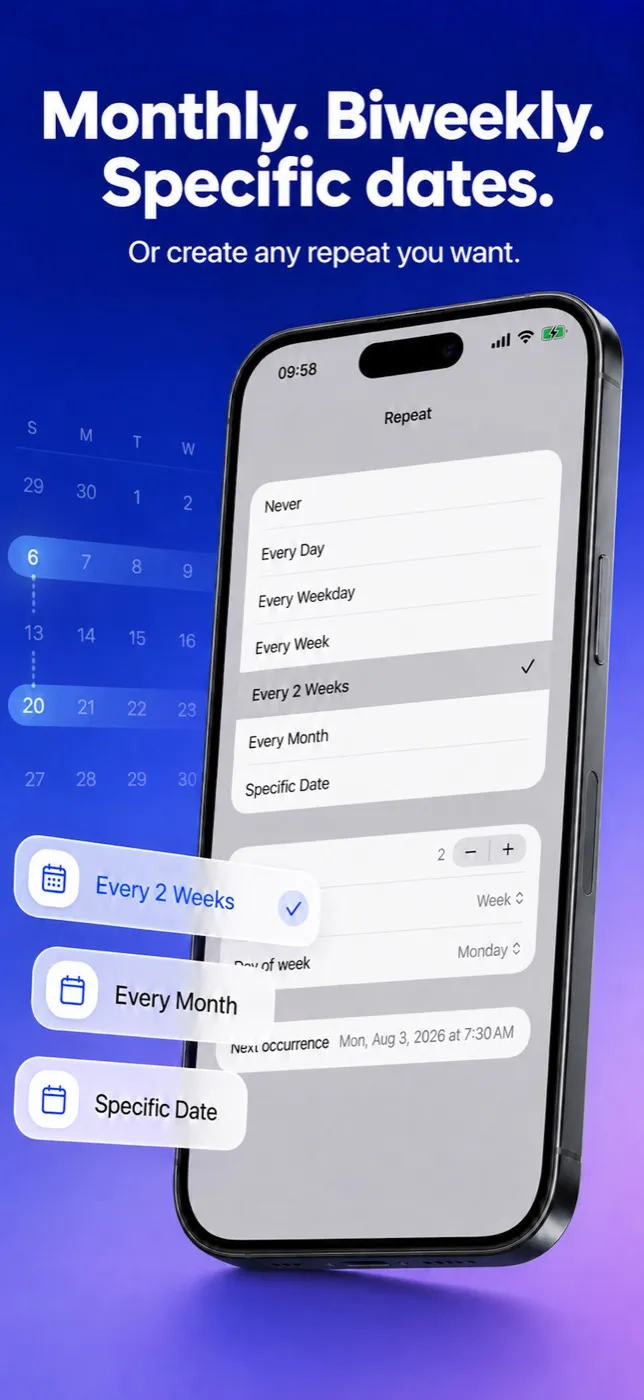
- Choose Specific Date. Tap Repeat and pick Specific Date, the last row of the list.
- Pick the day. A Date section appears with a calendar picker. It starts at today, so a past day can’t be chosen by mistake.
- Save and check. Go back and tap Save. Open the Calendar tab: the alarm sits on its day in the month view, and Today lists it as your next alarm once nothing rings before it.
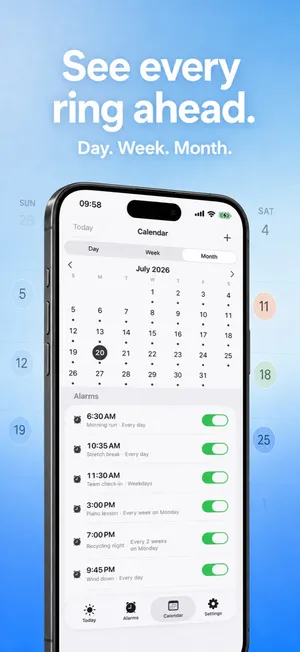
Because Alarm Pro arms a system alarm for that moment, you can close the app and forget about it; the alarm is already with iOS. Give Alarm Pro alarm permission when it asks — that is what lets it sound in Silent mode or during a Focus.
03 / Dates that come back
What if the date comes back every year, or every month?
A Specific Date alarm rings once and then counts as finished. For an anniversary, a licence renewal or an annual inspection, build a yearly rule instead: in Repeat choose Every Month, then change Unit to Year and use “Day each year” to set the month and day. Only the month and day are used. An alarm on February 29 rings on February 28 in years that have no 29th, rather than skipping the year.
For a fixed day every month — rent on the 1st, a bill on the 15th — keep the unit on Month and choose the Day of month. If you pick the 29th, 30th or 31st, shorter months ring on their last day instead of being skipped. The monthly alarm guide walks through that rule.
04 / What it costs to use
Is a specific-date alarm free in Alarm Pro?
Alarm Pro is free to download. In the free version you can keep one advanced alarm active at a time, and a Specific Date alarm is one of them, as are every-2-weeks, monthly and yearly rules. Once your dated alarm has rung it no longer counts, so a free user can set the next one afterwards. Ordinary one-time and weekday alarms stay unlimited. If you need several dates lined up at once — a week of exam mornings, three hospital appointments — the in-app purchase removes the limit and adds extra sounds.
Alarm Pro: Flexible Alarms
Dates, biweekly and monthly rules in one alarm app
Specific dates, every 2 weeks, every month, every N days or years, end rules, skip once and a Wake-Up Challenge, all as real system alarms. No account and no data collection.
Free to download · iOS 26.1 or later
More Alarm Pro guides
Sources
Frequently asked questions
Specific-date alarm questions
Can I set an iPhone alarm for next month without installing an app?
Not in Clock, which only stores a time and the weekdays it repeats on. Since iOS 26 the built-in alternative is a reminder in Reminders with a date, a time and Urgent turned on, which Apple says gives you an alarm when it is due.
Will a specific-date alarm in Alarm Pro ring when my iPhone is on silent?
Yes, once you have given Alarm Pro alarm permission. It schedules a real system alarm, which sounds in Silent mode and during a Focus, and it rings even if the app is closed.
Can I have several dated alarms at the same time?
The free version keeps one advanced alarm at a time, and a specific-date alarm is one of them; it stops counting after it has rung. For several upcoming dates at once, the in-app purchase removes that limit.
Does a Specific Date alarm repeat?
No, it rings once. For a date that returns every year, use Every Month, change the unit to Year and pick the month and day instead.
Can I send a dated alarm to someone else?
Yes. Share it as a link from the alarm; when the other person opens the link in Alarm Pro, it arrives with the same date, time and label.
Clock behavior is described from Apple’s own support pages as of the date above. Neobile LLC makes Alarm Pro and is not affiliated with Apple; Apple, iPhone and iOS are Apple Inc. trademarks.