
Pay tracker for substitute teachers
Substitute Teacher Pay Tracker
Every sub day, what each school owes you and your mileage
Or scan with your phone’s camera.
 iPhone and iPad
 Android
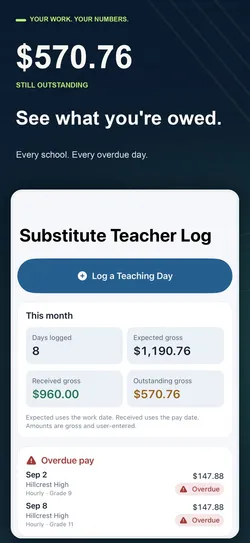
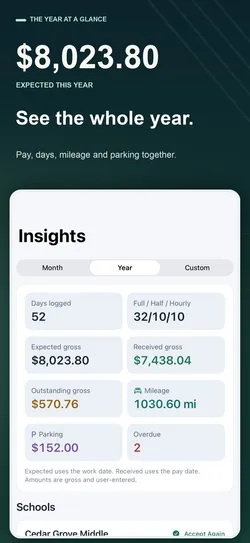
Substitute Teacher Pay Tracker is a private pay record for substitute teachers on iPhone, iPad and Android. Log each day in seconds from school presets, see what every school still owes you and what is overdue, settle a pay statement in one step, and total the year with mileage and parking, ready to export for tax time.
- iPhone, iPad and Android
- Works offline
- No account
- English and Spanish
- Full day, half day, hourly
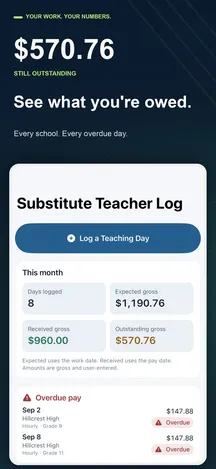
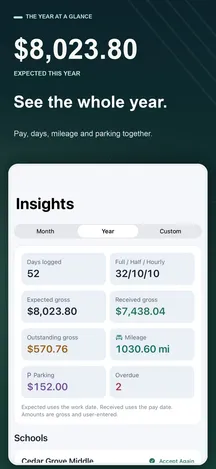
What you can do with Substitute Teacher Pay Tracker
See what every school still owes you
Every day you work, at every school and district, carries its status: outstanding, due today, overdue or received. Overdue pay is called out on your log, and a reminder arrives on the day your pay is due.
- As many work days and schools as you teach
- The month’s expected, received and outstanding gross on the home screen
Your whole year in one tap
Year totals of days worked, expected and received gross, outstanding pay, mileage and parking, or any date range you choose: a school year, a semester, one pay period.
- The year’s gross at hand for a retirement earnings limit
- Overdue days counted across the year
Know which schools are worth going back to
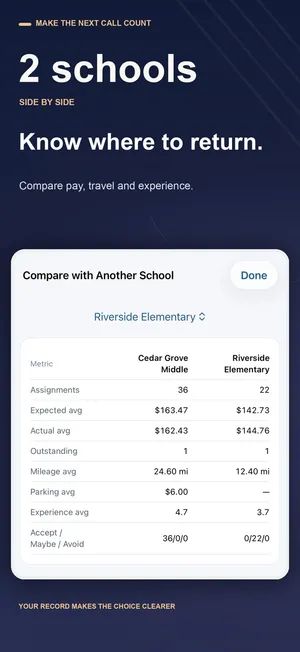
Each school gets its own summary of days, pay, mileage, parking, your rating and notes. Compare two schools side by side, and keep a private Accept Again, Maybe or Avoid preference for the next time one calls.
Settle a pay statement in one step
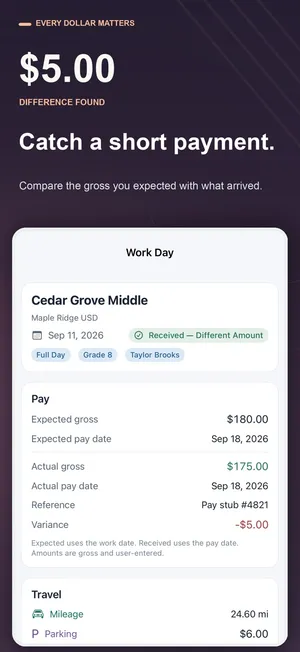
Select the days one statement covers and mark them received together. Enter the actual gross and see the difference from what you expected, to the cent; a short payment is never hidden by a tolerance.
- Half-day pay as quoted, never a full day halved
- Hourly pay rounded once
Log a day in seconds
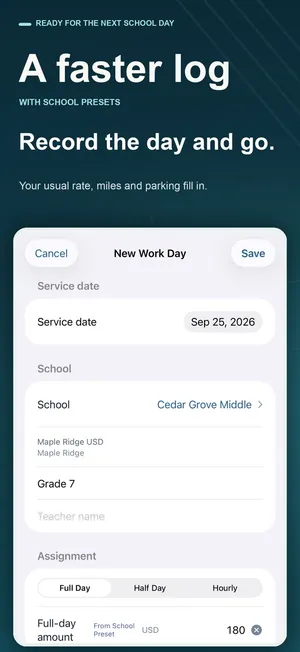
School presets fill in your usual rate, miles and parking, and an earlier day copies with one tap. Add the grade, teacher, full day, half day or hourly, mileage as miles or odometer readings, and private classroom notes.
Ready for tax time
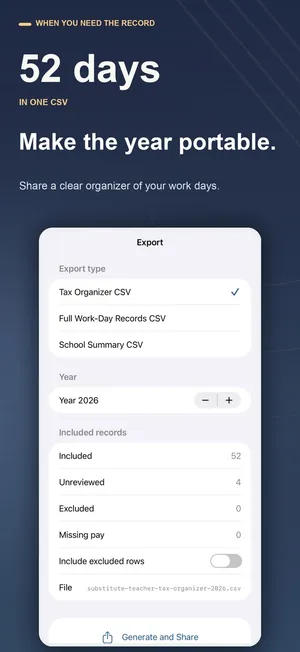
Export spreadsheet-ready CSV files: a mileage organizer, your full work-day records and a summary of every school, for you or your tax professional.
Everything in the app
Know what every school still owes you
- Each day carries a clear status: outstanding, due today, overdue or received
- Overdue pay is called out on your log, so nothing slips past a pay period
- Mark a day received, enter the actual gross from your pay statement and see the difference from what you expected
- Settle a whole pay period at once: select the days on one statement and mark them received together
- A reminder on the day your pay is due
Log a day in seconds
- School, grade, teacher and assignment type: full day, half day or hourly
- The gross pay you expect and the date you expect it
- Mileage as total miles or as odometer start and end, plus parking
- School presets fill in your usual rate, miles and parking; copy an earlier day with one tap
- Private classroom notes for routines, materials and who to ask for help
Your whole year, ready when you need it
- Month and year totals: days worked, expected gross, received gross, outstanding pay, mileage and parking
- Any date range: a school year, a semester, a pay period
- CSV files: a mileage organizer, your full work-day records and a summary of every school
Which schools are worth going back to
- Every school gets its own summary: days, pay, mileage, parking, your rating and your notes
- Compare two schools side by side
- A private return preference (Accept Again, Maybe or Avoid) in front of you the next time that school calls
Who is it for?
- Substitute and guest teachers who work across several schools or districts
- Retired teachers taking occasional assignments who need the year’s gross at hand
- Paraeducators and day-to-day subs who keep their own records
- Anyone who sees one lump sum on a pay statement and wants to know which days it covered
What makes it different?
Your record, not a job board
Substitute apps from districts and agencies find and book jobs. This one keeps what they do not hand you: each day you worked, what it should pay, when, and whether it arrived.
Expected versus received, to the cent
Half-day pay is the amount you enter, never a full day halved, and hourly pay is rounded once. A one-cent difference between expected and received is shown as a difference, never hidden by a tolerance.
Facts only, no tax guesses
The app keeps gross amounts, miles and parking. It does not calculate deductions, withholding, net pay or worker classification.
Private by design
Your work records stay on your device: no account, no cloud, no ads, and location is never requested.
Free tools and guides
Requirements
- Devices
- iPhone, iPad and Android
- iOS
- iOS 17.0 or later
- Android
- Check the Google Play listing for device compatibility
- Languages
- English, Spanish
- Internet
- Not needed; no account, no cloud
- Pay types
- Full day, half day, hourly
- Current version
- 1.2.2 · October 28, 2026
iOS: Neobile LLC · Android: KITEBLOOM LLC
Substitute Teacher Pay Tracker keeps factual records only; it is not tax, payroll or legal advice and does not connect to any district or employer.
Questions people ask
How do I keep track of substitute teacher pay?
Log every day you work with the school, the assignment type and the gross pay and pay date you expect. When the pay statement arrives, mark those days received with the actual gross. Anything past its expected date and still unpaid is overdue, so you know exactly which school to call.
Does it connect to Frontline, Red Rover or my district?
No. It is a personal record book. It does not find or accept jobs and does not connect to a district, an agency, payroll or a bank. You enter what you worked and what you were told it pays.
Does it calculate my taxes or mileage deduction?
No. It totals gross pay, miles and parking and exports them as CSV files. It does not calculate deductions, withholding or net pay, and it is not tax or payroll advice.
Can it help a retired teacher watch an earnings limit?
It shows your gross for the year, or any date range, in one tap. The limit itself and how it is counted are set by your retirement system, so check the rule with them.
Can I see what each school still owes me?
Yes. Every day carries its status, and each school’s summary shows its days, expected and received gross and what is still outstanding. Overdue days are called out on your log, so you know which payroll office to call, and you can compare two schools side by side.
Can I mark a whole pay statement received at once?
Yes. Select the days one statement covers and settle them together, entering the actual gross for each. Any day that arrived short or over shows its difference to the cent, and days left out stay marked as owed.
Is my information uploaded anywhere?
No. Your work days, pay and notes stay on your device. There is no account, no cloud, no ads and no tracking, your work records never leave the device, and the app never asks for your location. Do not enter student names in classroom notes.
Does it work in Spanish?
Yes. The app is available in English and Spanish for iPhone and iPad (iOS 17.0 or later) and on Android through Google Play.


