A personal recordkeeping guide for substitute teachers
How to track substitute teacher pay, mileage, and work days
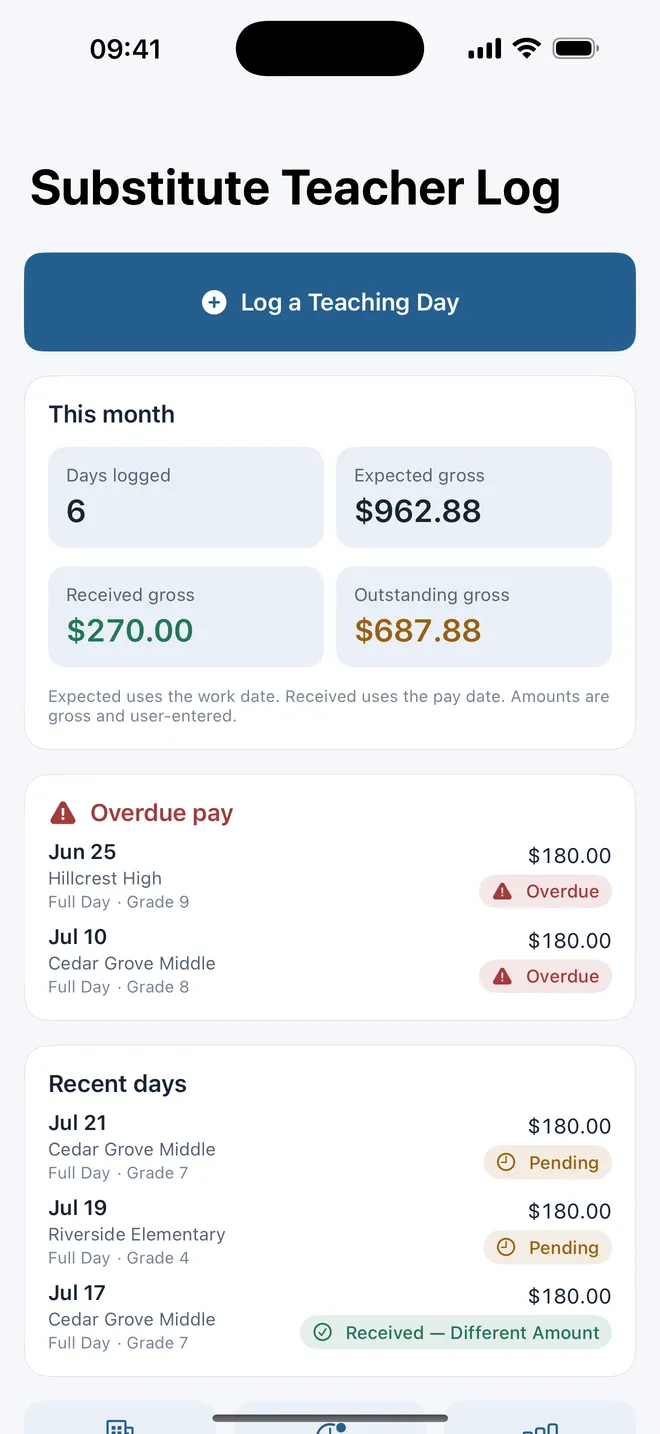
Create one record for every teaching day before the details are lost. Keep the school and assignment, expected gross pay and date, mileage and parking, then reconcile the record with the actual gross amount and pay date when the pay statement arrives.
A personal log supports your records; it does not replace district timekeeping, payroll records, tax advice, or the employer’s reporting requirements.
Pay, mileage, and school notes for substitute teachers
01 / Capture the assignment once
Log the work day before moving to the next school
Use one record per paid teaching day. Start with the service date, school and district, grade, regular teacher or assignment reference, and whether the job was full day, half day, or hourly. Add the expected gross pay and the date the district or agency says payment should arrive.
A useful substitute work-day record
- Work date and school
- District and assignment reference
- Grade, teacher, and full-day, half-day, or hourly type
- Expected gross pay and expected pay date
- Total mileage or start and end odometer readings
- Parking amount and a receipt or note reference
- Private school context without student information
The district’s official system remains the source for accepted assignments and submitted time. Your personal record fills a different gap: it lets you see work across several schools or systems in one consistent format and gives you something concrete to compare with later pay statements.
02 / Keep the expectation and the outcome
Reconcile substitute pay instead of overwriting it
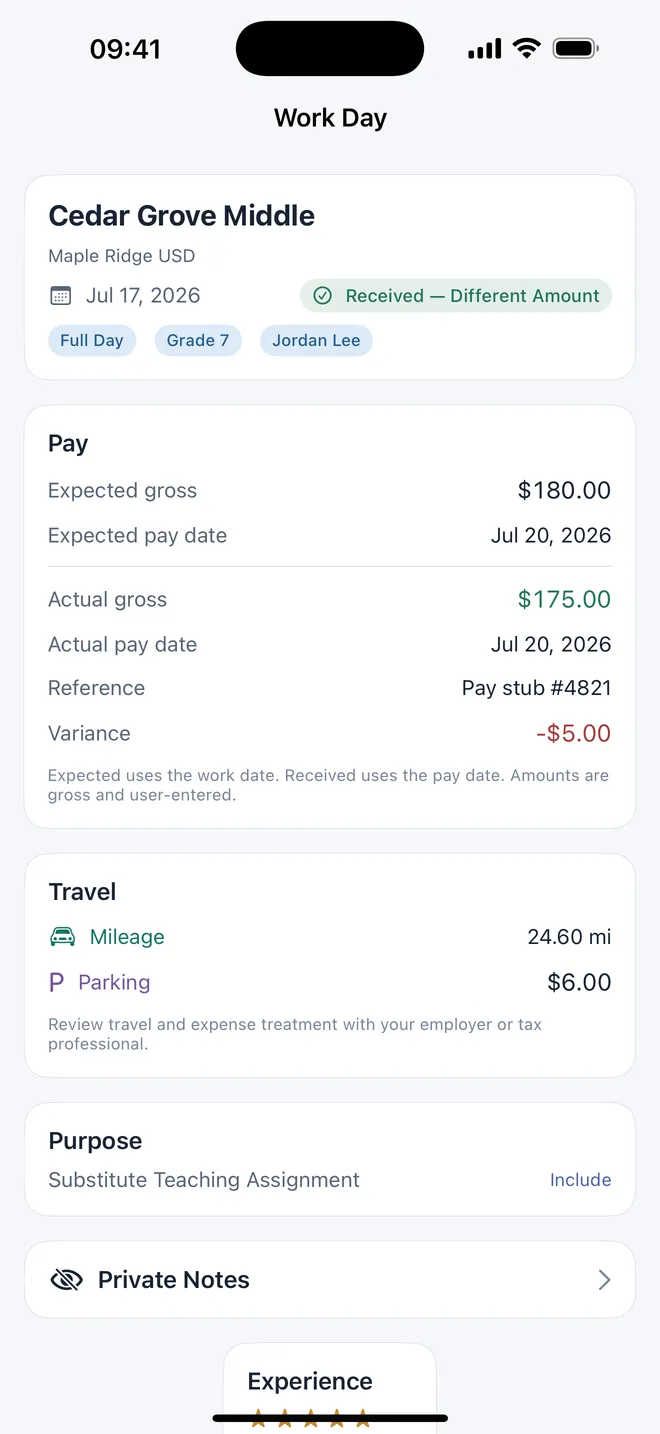
When payment arrives, open the original work-day record. Enter the actual gross amount shown on the pay statement, the actual pay date, and a non-sensitive reference. Compare actual with expected and retain the variance. If the assignment has not been paid by the expected date, keep it visible as overdue until you resolve it.
Expected view
- Organized by work date
- Shows what the logged assignments were expected to produce
- Keeps upcoming and overdue pay dates visible
Received view
- Organized by actual pay date
- Uses the gross amount from the pay statement
- Preserves differences from the original expectation
These two views answer different questions. “What did I work in September?” uses work dates. “What gross pay arrived in September?” uses pay dates. Keeping them separate prevents a late payment from changing the historical record of when the job occurred.
03 / Preserve travel facts
Track mileage and parking with the work day
Record mileage using one consistent method: either the total business miles you intend to document or start and end odometer readings. Add parking and a brief receipt reference when appropriate. Do not mix commute, reimbursable travel, and other categories unless your employer or tax professional has told you how they should be treated.
The purpose of the log is to preserve facts, not decide deductibility. Keep the destination, date, distance, purpose, and supporting records your district, employer, or professional adviser requires. The app does not request location and does not infer a route.
04 / Build your own school memory
Remember what made an assignment work
Substitute teachers often return to the same buildings with different grades and teachers. A private school record can preserve practical details such as parking, office check-in, bell or lunch timing, materials, staff support, and your own experience rating. Add a simple Accept Again, Maybe, or Avoid preference for your future decisions.
Keep classroom notes about routines and logistics. Avoid student names, behavior profiles tied to identifiable children, disability information, health details, or any other protected student information. Follow every school and district policy about personal devices and records.
Job-finding tools focus on available assignments and acceptance. A personal substitute teacher log focuses on what happened after you accepted: where you worked, what you expected to receive, whether it arrived, what travel you recorded, and whether you would choose that school again.
One private record across schools
Substitute Teacher Pay Tracker keeps work, pay, travel, and school context together
Log full-day, half-day, or hourly assignments; track expected and received gross pay; record mileage and parking; see outstanding and overdue work; and review your own experience across schools. Everything stays in a protected local file.
- Work-day history
- Expected pay dates
- Actual-pay reconciliation
- Mileage and parking
- Private school preferences
- Monthly and yearly totals
Pay, mileage, and school notes for substitute teachers

Offline and private. No district, payroll, banking, or location connection.
Frequently asked questions
Substitute teacher work-log FAQ
What should a substitute teacher track for each work day?
Keep the date, school, district, grade or assignment context, full-day, half-day, or hourly type, expected gross pay, expected pay date, mileage, parking, and any private notes you will need later. Add an assignment or confirmation reference when useful.
How do I track whether substitute teaching pay was received?
Keep expected gross pay and expected pay date with the work day. When the pay statement arrives, record actual gross pay, actual pay date, and a reference. Retain the difference instead of overwriting the original expectation.
Should expected and received pay use the same month?
Not necessarily. Expected totals can be organized by the date worked, while received totals should use the actual pay date. Keeping both views prevents a June assignment paid in July from disappearing or being counted twice.
Can Substitute Teacher Pay Tracker find or accept assignments?
No. It is a personal record book. It does not connect to Frontline, a district, a staffing agency, payroll, or banking, and it does not accept jobs.
Should classroom notes include student names?
No. Keep notes limited to context you may need for a future assignment, such as routines, materials, parking, bell schedules, and staff support. Do not enter student names or protected student information.
Substitute Teacher Pay Tracker stores factual entries supplied by the user. It does not calculate deductions, withholding, net pay, mileage deductions, or worker classification and is not tax, payroll, employment, or legal advice. Follow district policy and never enter student names or protected student information.