Free printable · Substitute Teacher Pay Tracker
Substitute teacher pay and mileage log (free PDF and CSV)
A substitute pay log needs one row per day worked with the date, school, full-day, half-day or hourly type, the gross pay you expect and when, what actually arrived and when, the difference, and miles and parking. Download the one-page landscape PDF or the spreadsheet version below; both follow the same rules as the Substitute Teacher Pay Tracker app.

Substitute Teacher Pay Tracker
Every sub day, what each school owes you and your mileage
Free to download for iPhone, iPad and Android.
Download the log
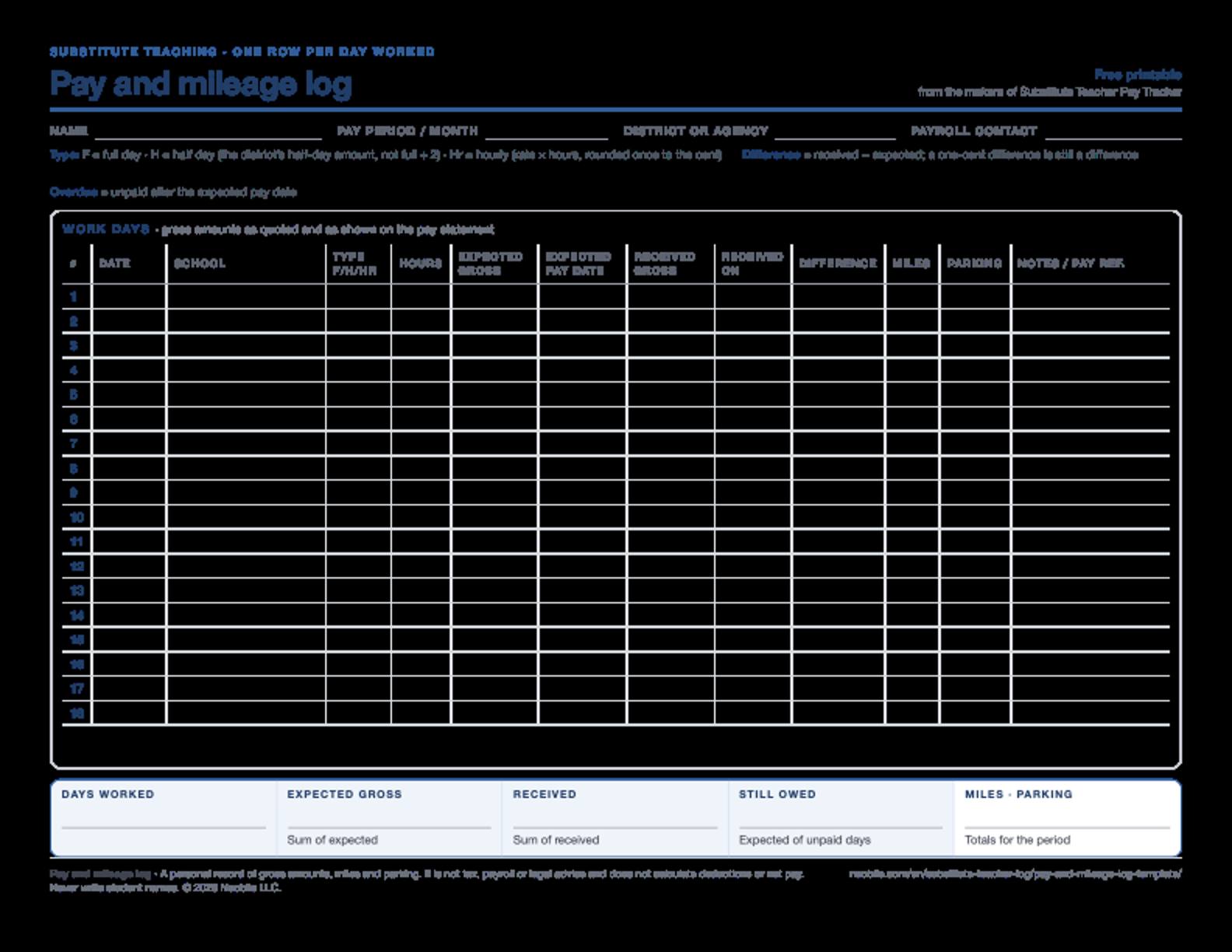
One landscape page with eighteen rows, enough for a typical pay period of daily assignments. A key at the top spells out the three rules that catch most pay mistakes, and a totals box at the bottom gives you the numbers to compare with the statement.
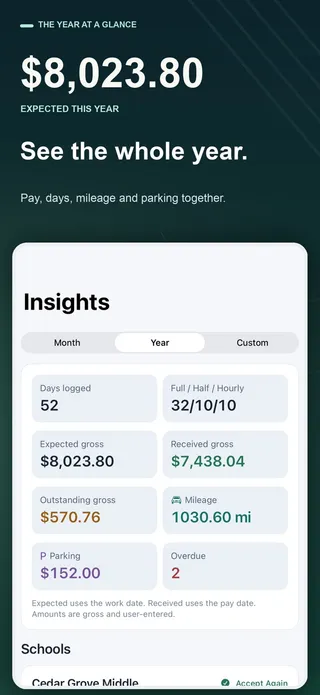
Download the PDFSpreadsheet (CSV)Substitute Teacher Pay Tracker keeps the same log on your phone instead: presets fill in the rate, miles and parking, overdue pay is flagged for you and the year adds itself up.
What goes in each column?
- Date and school. The day you worked and where. Add the district if you take jobs from more than one, since they pay on different schedules.
- Type and hours. F for a full day, H for a half day, Hr for hourly with the hours worked. A half day is whatever the district quotes for one, which is not always half of a full day.
- Expected gross and expected pay date. What the assignment should pay before deductions, and the date payroll or the agency told you to expect it. Hourly work is rate times hours, with a single rounding to the cent.
- Received gross and received on. Filled in when the statement or deposit arrives. Copy the gross amount shown for that day, not the net deposit.
- Difference. Received minus expected. Write it even when it is one cent; small differences repeated over a year add up and are easy to miss.
- Miles, parking and notes. The miles you drove for that assignment, any parking you paid, and a pay reference or a note for yourself. Never write a student’s name.
How to use it through a pay period
Fill in the first five columns the evening you work, while you still remember the school and the hours. When a pay statement arrives, find each day it covers and write the received amount and date next to it. Any row that is still blank after its expected pay date is overdue: that is the list to send to payroll, with the dates and schools. At the end of the period, total the columns in the box at the bottom and keep the page with the statement.
If you work for several districts, use one sheet per district, because each one pays on its own calendar and a combined total makes a missing day harder to spot. The same goes for agency work and direct district work.
Spreadsheet version
The CSV has the same fields with names taken from the Substitute Teacher Pay Tracker export (service_date, school_name, assignment_type, expected_gross_pay, actual_gross_pay, gross_variance, business_miles and so on), plus three sample rows that show a short payment, an exact one and an hourly day still outstanding. Delete the samples and add a row per day. Dates are written as year-month-day so they sort correctly.
Paper works, but it relies on you to do the adding and to notice what is late. The app keeps the same record with the arithmetic and the reminders done for you, and exports a mileage organizer and full work-day records as CSV when you need them.
Questions people ask
What should a substitute teacher keep in a pay log?
For every day worked: the date, the school and district, full day, half day or hourly (with the hours), the gross pay you expect and the date you expect it, then the gross that actually arrived and when. Add miles driven, parking and a pay reference if the statement has one.
Is there a substitute teacher mileage log I can print?
Yes. The PDF on this page has miles and parking columns on every row and a totals box for the period. Write miles as the round trip you actually drove for that assignment, or note odometer readings if you prefer them.
Can I use the log for my taxes?
It gives you an organised record of gross amounts, miles and parking. Whether any of it matters for your taxes depends on your situation; ask a tax professional. The sheet does not calculate deductions, withholding or net pay.
Should I use the PDF or the spreadsheet?
Use the PDF if you like writing at the end of the day or keep a folder for each pay period. Use the CSV if you prefer a spreadsheet: it opens in Excel, Numbers or Google Sheets with the columns already named and three sample rows to overwrite.
How is this different from the app?
The paper log holds what you write. Substitute Teacher Pay Tracker fills in your usual rate, miles and parking from school presets, reminds you on payday, flags overdue and short payments automatically, and totals the month and year for you.
