
Neobile LLC · iOS 17.0 or later
FluencyCalc: Running Record
FluencyCalc: Running Record is an iPhone and iPad app for K–5 teachers, interventionists, tutors and homeschool parents: tap miscues while a child reads and WCPM, accuracy and both ratios appear when the timer stops. ORF and running-record rules stay separate. Free to download; saving reads to students, growth charts and reports need an in-app purchase.
Running records and WCPM on iPhone and iPad
Current version 1.3 · October 3, 2026
Inside the app
Who is it for?
- K–5 classroom teachers who run running records or oral reading fluency checks every week
- Reading interventionists and specialists monitoring progress for a caseload
- Tutors who want a clear record of each session’s read
- Homeschool parents who want the same numbers a school would report
What does it do?
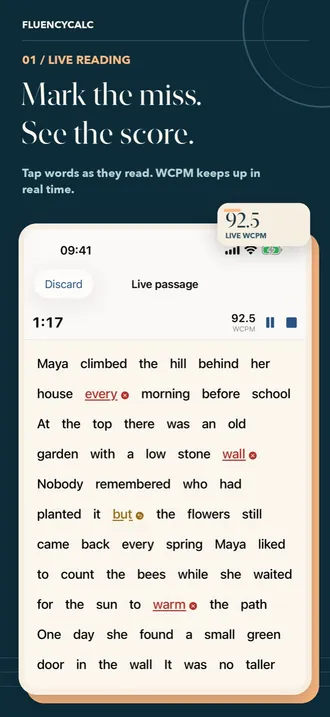
Live tap-marking
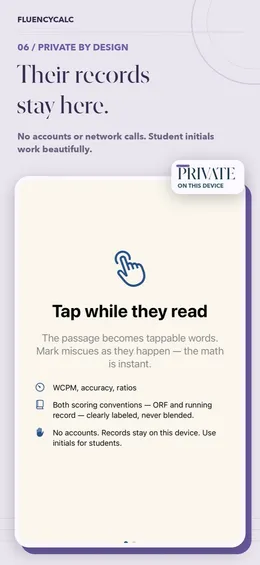
- Any passage you own becomes tappable words; tap once for an error, again for a self-correction
- Timer, insertion counter, undo and a running WCPM preview while the child reads
- Long-press to set the last word read; the 60-second mode stops the clock and asks for the stopping word
- A short original practice passage is built in, so you can try a live read in the first minute
Quick calculator
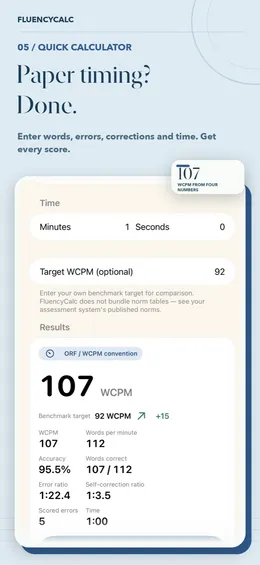
- Enter words, errors, self-corrections and time; every score appears instantly
- “How calculated” shows the arithmetic with your numbers in it
Two conventions, clearly labeled
- ORF/WCPM (curriculum-based measurement): insertions are not counted, self-corrections count as correct
- Running record: insertions count as errors, self-corrections feed the SC ratio
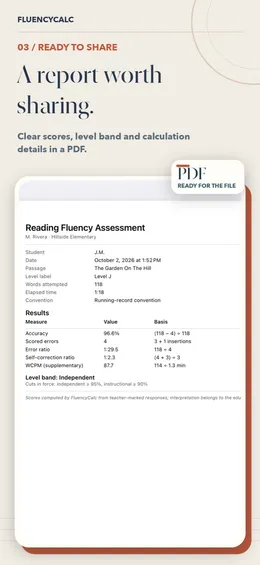
- Reading-level bands with cut-offs you set (95% / 90% by default), printed on every report
- Your own benchmark targets for comparison
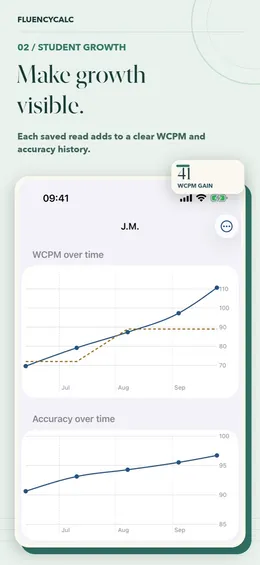
Growth and reports
- Save each read under a student; initials are enough
- WCPM and accuracy charts over time with your benchmark line, plus a growth card to share
- PDF report of any assessment with your name and school in the header
- CSV for one student or a summary of the whole class; your own passage library
What makes it different?
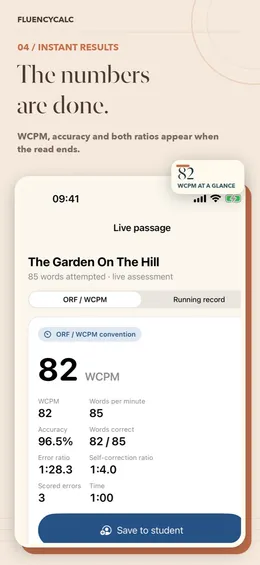
Scores the moment the read ends
Marking and math happen together: WCPM, accuracy, error ratio and self-correction ratio are computed from your taps, with no tally to add up afterwards.
Conventions never blended
An ORF probe and a running record treat insertions and self-corrections differently. The app keeps the two rule sets apart and labels which one produced each score.
Private by design
No accounts, no ads, no analytics and no network calls. Records stay on the device, student fields are designed for initials, and an optional app lock is available.
Bring your own materials
It includes no published leveled passages and no norm tables: you use texts and benchmark targets your school already has the right to use.
What is free and what is paid?
Free
- Live tap-marking of any passage you paste or type, with the timer and 60-second mode
- The quick calculator with every score and the “How calculated” arithmetic
- Both scoring conventions, level bands and benchmark comparison
With an in-app purchase
- Saving reads to student profiles, with history
- WCPM and accuracy growth charts and the shareable growth card
- The passage library
- PDF and CSV reports, including your name and school in the header
Requirements
- Devices
- iPhone and iPad
- System
- iOS 17.0 or later
- Languages
- English, Spanish, French
- Account
- None; works offline
- Current version
- 1.3 · October 3, 2026
FluencyCalc computes the numbers; interpretation always belongs to the educator. It makes no diagnosis or instructional prescription.
Questions people ask
Does FluencyCalc work offline?
Yes. Everything runs on the device with no network calls, so it works in a classroom with no Wi-Fi. There is no account to create.
Is student data uploaded anywhere?
No. FluencyCalc has no accounts, no analytics and no servers; records stay on the iPhone or iPad. Student fields are designed for initials or first names, and you can turn on an app lock.
Is FluencyCalc free?
It is free to download, and live tap-marking, the quick calculator, both conventions and level bands are free to use. Saving reads to students, growth charts, the passage library and PDF or CSV exports need an in-app purchase.
Does it work on iPad?
Yes. It runs on iPhone and iPad with iOS 17.0 or later; a larger screen makes long passages easier to tap.
Which formula does it use for WCPM and accuracy?
WCPM = (words attempted − scored errors) ÷ seconds × 60, and accuracy = correct words ÷ words attempted × 100. In the running-record convention insertions are added to the scored errors; in the ORF convention they are not. “How calculated” shows each step with your numbers.
Does it include reading passages or national norms?
No. It includes one short original practice passage, but no published leveled passages or norm tables. You bring your own texts and enter the benchmark targets your school uses.
Can I change the independent and instructional cut-offs?
Yes. The defaults are 95% for independent and 90% for instructional; you can set your own, and the cut-offs in force are printed on every report.

