
Neobile LLC · iOS 17.0 or later
My LoopCal: 4-20mA Calibration
My LoopCal turns a 4–20 mA loop check into a calibration worksheet you can hand over: guided 3-, 5- or custom-point as-found and as-left runs with error and pass/fail at every point, plus a signal converter and loop power math. Built for instrumentation technicians, fully offline. Free to download; extra checks and exports need an in-app purchase.
Offline 4–20 mA worksheets and loop math
Current version 1.3 · October 6, 2026
Inside the app
Who is it for?
- Instrumentation and calibration technicians checking transmitters in the field
- I&E and maintenance electricians who scale and troubleshoot 4–20 mA loops
- Control-system and commissioning engineers preparing expected values
- Apprentices learning loop math with the formula shown step by step
What does it do?
From check to worksheet
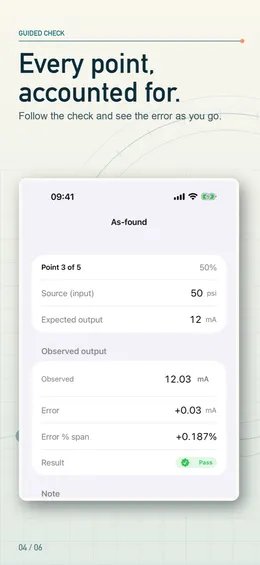
- Guided three-point, five-point and custom 2–21-point checks
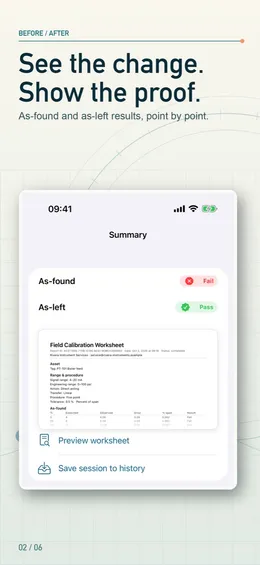
- As-found and as-left runs, with the error and pass/fail at every point
- Up-scale and down-scale readings with hysteresis
- Tolerance as percent of span, signal units or engineering units; worst point and maximum error summarized
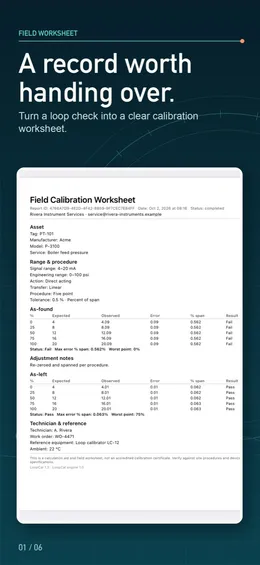
- A PDF worksheet with your company name and logo, in US Letter or A4, plus CSV
Convert in seconds
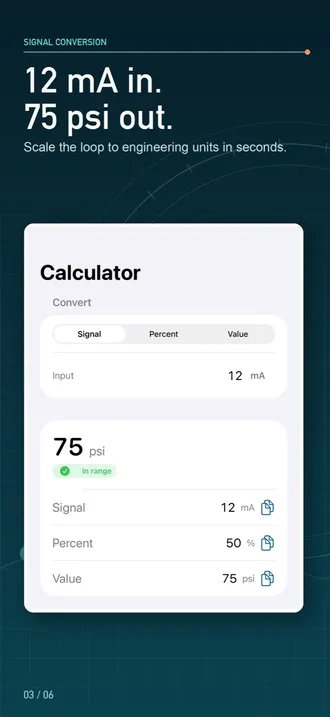
- 4–20 mA, 0–20 mA, 0–10 V, 1–5 V and custom signal endpoints
- Direct-acting and reverse-acting ranges; linear and square-root (flow) transfer functions
- Engineering ranges with any unit, including negative and offset spans
- Percent, signal and engineering values update as you type, with the substituted formula shown
- “Verify this loop” takes the range you just entered straight into a check
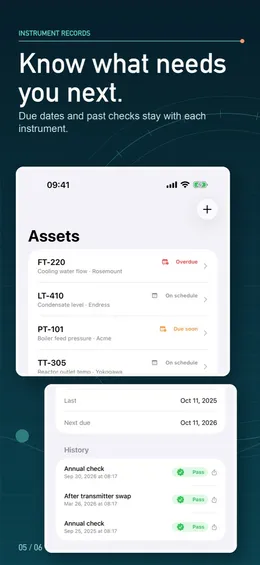
Every instrument on record
- Saved instruments with their ranges and calibration history
- What is coming due, with a reminder before the next calibration
- Reopen a saved instrument and start its next check without retyping the range
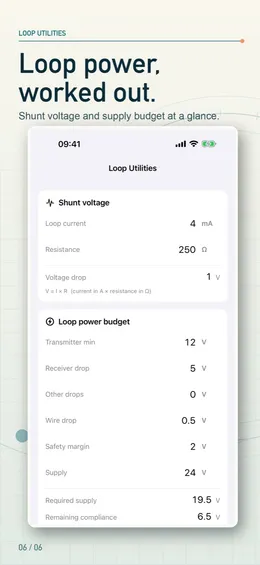
Loop power math
- Shunt resistor voltage drop
- Required supply voltage and remaining compliance
- Maximum loop and wire resistance
What makes it different?
A worksheet, not just a number
Expected, observed, error, percent-of-span error and pass/fail for every point, as-found and as-left side by side, ready as a PDF to hand over.
The formula is visible
Every conversion shows the substituted steps — signal fraction, acting direction, square root, engineering value — so a reviewer can follow it.
Out-of-range stays visible
A reading below live zero or above 20 mA is shown as under or over range, never silently clamped.
Offline on the device
No account, no ads, no tracking and no network. It works in plants, vaults and remote sites without signal.
What is free and what is paid?
Free
- The signal converter: every range type, direction and transfer function, without limit
- Loop power utilities: shunt drop, supply budget, compliance and maximum resistance
- One guided three-point as-found check with its full worksheet on screen
With an in-app purchase
- Further checks, five-point and custom-point procedures, hysteresis and as-left runs
- Saved instruments, calibration history and due-date reminders
- PDF worksheets with your company name and logo, and CSV export
Requirements
- Devices
- iPhone and iPad
- System
- iOS 17.0 or later
- Languages
- 18, including English, Spanish, Portuguese, French, German, Italian, Dutch, Polish, Russian, Turkish, Arabic, Japanese, Korean, Simplified and Traditional Chinese, Thai, Vietnamese and Indonesian
- Account
- None; works offline
- Current version
- 1.3 · October 6, 2026
My LoopCal is a calculation aid and field worksheet — not a calibrator, an accredited calibration service, or a replacement for manufacturer procedures. Always follow site lockout/tagout, operations authorization, device manuals and approved procedures.
Questions people ask
Is My LoopCal a calibrator?
No. It is a calculation aid and field worksheet. It does not connect to, source, measure or configure any equipment; you use your own calibrator or meter and enter the readings.
Does it work offline?
Yes. Everything runs on the device with no account, no ads, no tracking and no network, so it works where there is no signal.
What does a five-point check record?
The expected input and output at 0, 25, 50, 75 and 100% of span, the observed output, the error, the error as a percent of span and pass/fail against your tolerance — optionally down-scale too for hysteresis — for the as-found and, after any adjustment, the as-left run.
Is it free?
It is free to download, and the signal converter and loop power utilities are free without limit. A new install includes one guided three-point as-found check; further checks, five-point and custom procedures, as-left runs, saved instruments and PDF/CSV export need an in-app purchase.
Does it handle square-root flow and reverse-acting ranges?
Yes. Ranges can be direct or reverse acting and linear or square-root, with any engineering unit, including negative and offset spans.
Can I add my company logo to the worksheet?
Yes. The PDF worksheet carries your company name and logo and prints in US Letter or A4.


