Pinning charts for locksmiths
PinningLab: Locksmith Charts
SFIC A2 and master-keyed pinning charts
PinningLab: Locksmith Charts is for iPhone and iPad; there is no Android version.
Or scan with your phone’s camera.
 iPhone and iPad
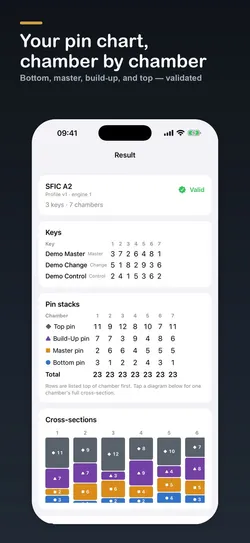
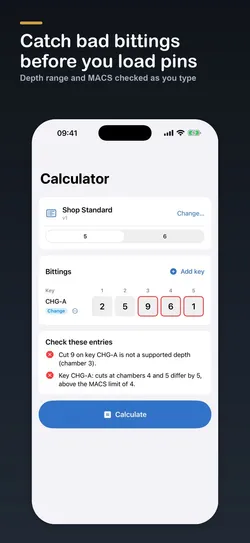
PinningLab is a pinning-chart calculator for locksmiths on iPhone and iPad. From key bittings you already have, it builds SFIC A2 and master-keyed conventional charts chamber by chamber, checks depths, MACS, control collisions and the pin kit before you load a core, counts every pin and exports the job worksheet.
- iPhone and iPad
- Works offline
- No account
- Face ID lock
- English and Spanish
What you can do with PinningLab: Locksmith Charts
SFIC A2 charts, chamber by chamber
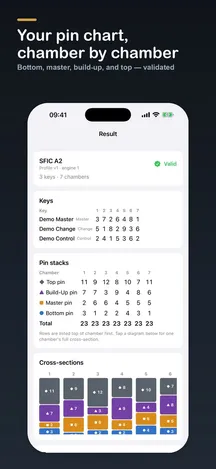
Enter the operating keys and the control key and get bottom, master, build-up and top pins for every chamber, with the control shear line and the 23-increment total stack worked out for you.
- Checked against the manufacturer’s own worked example
- Every bundled profile cites its source document
Master-keyed conventional charts
Single key, keyed-alike or a chart with as many operating keys as the job has: top master, sub-masters and change keys in 5, 6 or 7 chambers, with spreadsheet-style entry and paste.
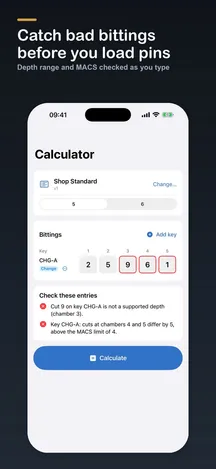
Catch a bad bitting before you load a pin
Depth range, MACS, control collisions and the pin kit are checked as you type. Errors name the exact chamber and key, and nothing is ever rounded to the nearest pin.
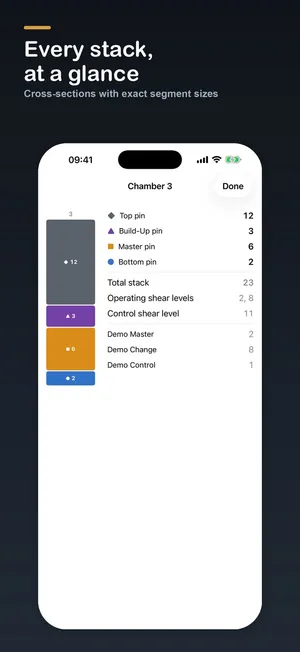
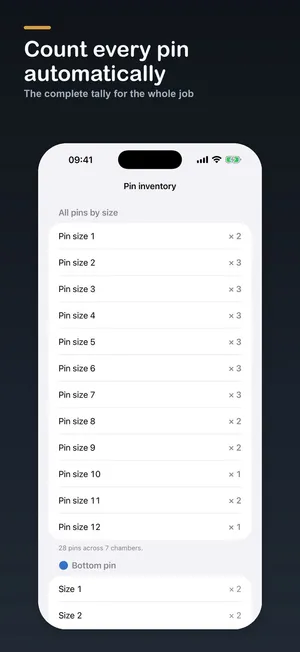
Every stack at a glance, every pin counted
Tap a chamber for its cross-section with exact segment sizes and shear levels, and get the complete pin tally for the job, by size and by role, before you open the kit.
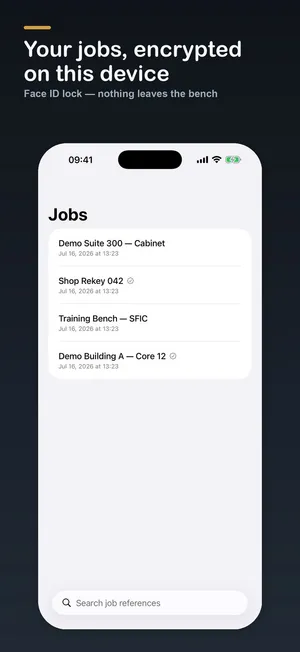
Your jobs, encrypted on the device
Every job is saved with its keys and chart in AES-encrypted storage, behind Face ID or Touch ID if you like, and searchable by job reference.
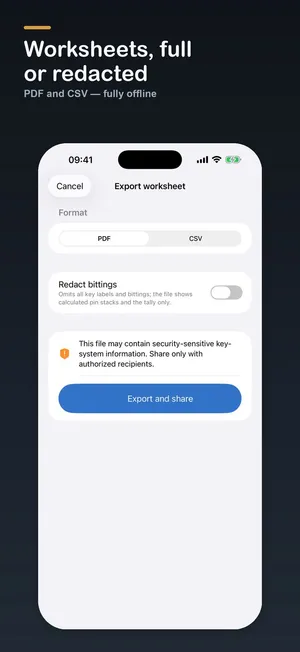
Worksheets, full or redacted
Export a PDF or CSV worksheet for the bench or the file. The redacted mode leaves out key labels and bittings and keeps the pin stacks and the tally.
Everything in the app
Calculate
- SFIC A2 with control shear line, build-up pins and the total-stack rule
- Conventional cylinders: single key, keyed-alike and multi-key master charts
- 5, 6 or 7 chambers with spreadsheet-style entry and paste
- Your own conventional profiles, verified by your own test case
Validate
- Depth range, MACS, control collisions and pin-kit checks
- Blocking errors at the exact chamber; never a nearest pin
- Bundled profiles cite the manufacturer document, revision and pages
Document
- Chamber tables and visual pin-stack cross-sections
- Complete pin tally for the job
- PDF or CSV worksheets, with an optional redacted mode
- Encrypted job history, Face ID or Touch ID lock, app-switcher privacy
Who is it for?
- Licensed locksmiths who pin SFIC cores and master-keyed cylinders
- Institutional locksmiths and door-hardware technicians at campuses and hospitals
- Supervised apprentices learning to read and check a pinning chart
- Anyone replacing a spreadsheet that has to be rechecked by hand
What makes it different?
No silent rounding
If a chamber needs a pin the profile cannot supply, or a cut breaks MACS, the chart stops and names the chamber. It never swaps in the closest pin.
Sourced profiles
Each bundled profile shows the manufacturer document, revision and pages it was transcribed from, including a documented erratum in the published A2 example.
Built for authorized work
It calculates from bittings you already have. It does not decode keys from photos, generate key systems or teach bypass techniques.
Private at the bench
No account and no ads. Jobs are AES-encrypted on the device, with an optional Face ID lock and screen-capture protection.
Free tools and guides
Requirements
- Devices
- iPhone and iPad
- iOS
- iOS 17.0 or later
- Internet
- Not needed; no account
- Systems
- SFIC A2; conventional pin tumbler (bundled and your own profiles)
- Chambers
- 5, 6 or 7
- Languages
- English, Spanish
- Current version
- 1.0.1 · October 29, 2026
Neobile LLC · iOS 17.0 or later
PinningLab is an independent product of Neobile LLC and is not affiliated with any lock manufacturer. Verify every chart against the current manufacturer procedure and your system specification before loading a core.
Questions people ask
How is an SFIC A2 pin stack calculated?
The operating levels are the key cuts in that chamber, lowest to highest: the lowest is the bottom pin and the steps between them are master pins. The control level is the control cut plus 10; the build-up pin fills the gap from the highest operating level to it, and the top pin brings the stack to 23. Try it in the free A2 calculator on this site.
Can it build master-keyed charts with several keys?
Yes. Add the top master, sub-masters and change keys as rows; each chamber gets its bottom and master pins, and the pin tally counts every segment for the job.
What does it check before I load pins?
That every cut is a supported depth, adjacent cuts respect the MACS limit, the control shear line clears every operating level, and every calculated segment exists in the selected pin kit. A failure blocks the chart at the exact chamber.
Can I add my own cylinder profile?
Yes, for conventional cylinders: define the depths, increments, MACS and pin kit, and verify the profile with a test case of your own before you use it on a job.
Can I share a worksheet without the key bittings?
Yes. The redacted export leaves out key labels and bittings and keeps the calculated stacks and the tally, as PDF or CSV.
Does PinningLab decode keys or generate key systems?
No. It calculates from bittings you already have for locks you are authorized to service. It does not decode keys from photos, generate combinations or master-key systems, or teach bypass techniques.


