A practical checklist for teachers and interventionists
A running record app should save teacher attention, not hide the math
Look for two workflows: live marking during the read and quick entry after a paper assessment. The app should keep raw counts, scoring conventions, WCPM, accuracy, error ratio, and self-correction ratio visible; preserve student history over time; and let the educator export useful records without supplying its own unsupported interpretation.
A convenient calculator does not define your scoring protocol. Use the error rules, passage requirements, reading-level bands, and benchmarks required by your school or assessment system.
Running record and oral reading fluency tools for educators
01 / Evaluate the workflow
Six features that matter during a real reading assessment
Tap the word, keep listening
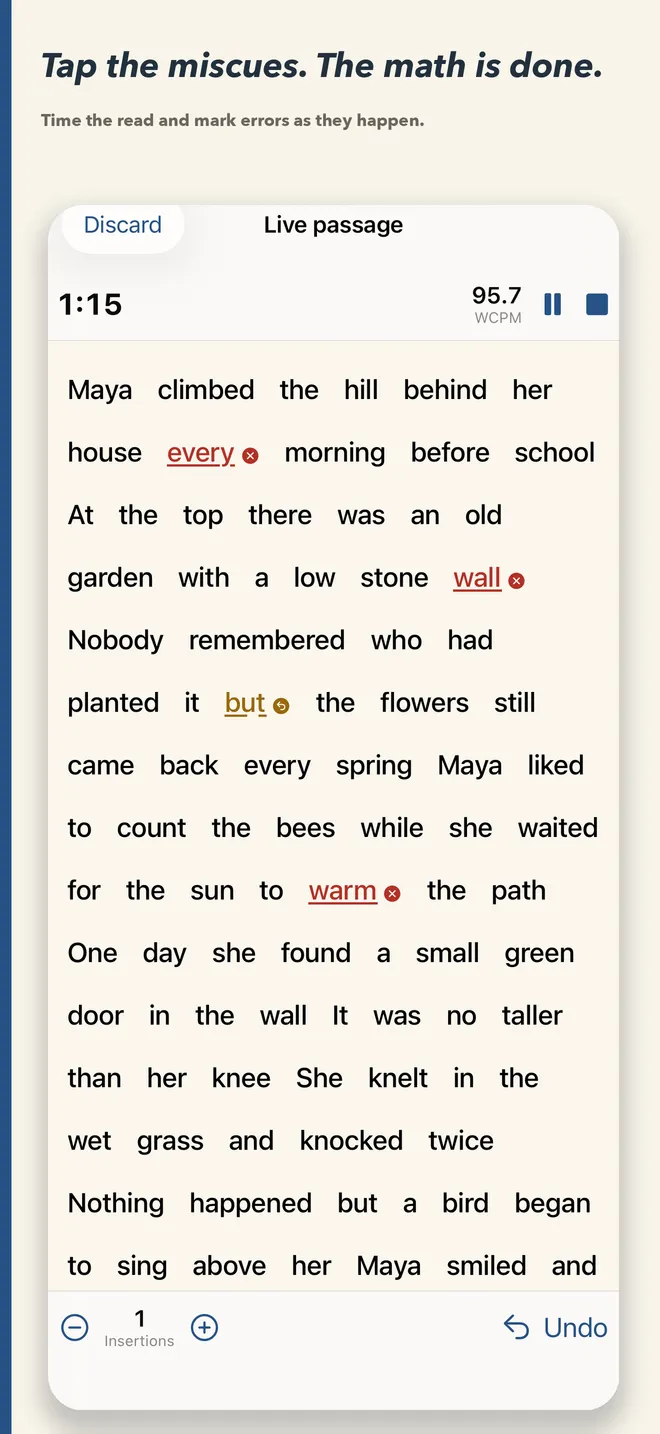
The interface should let you mark a miscue or self-correction, undo quickly, and identify the last word without taking attention away from the reader.
Respect the paper record
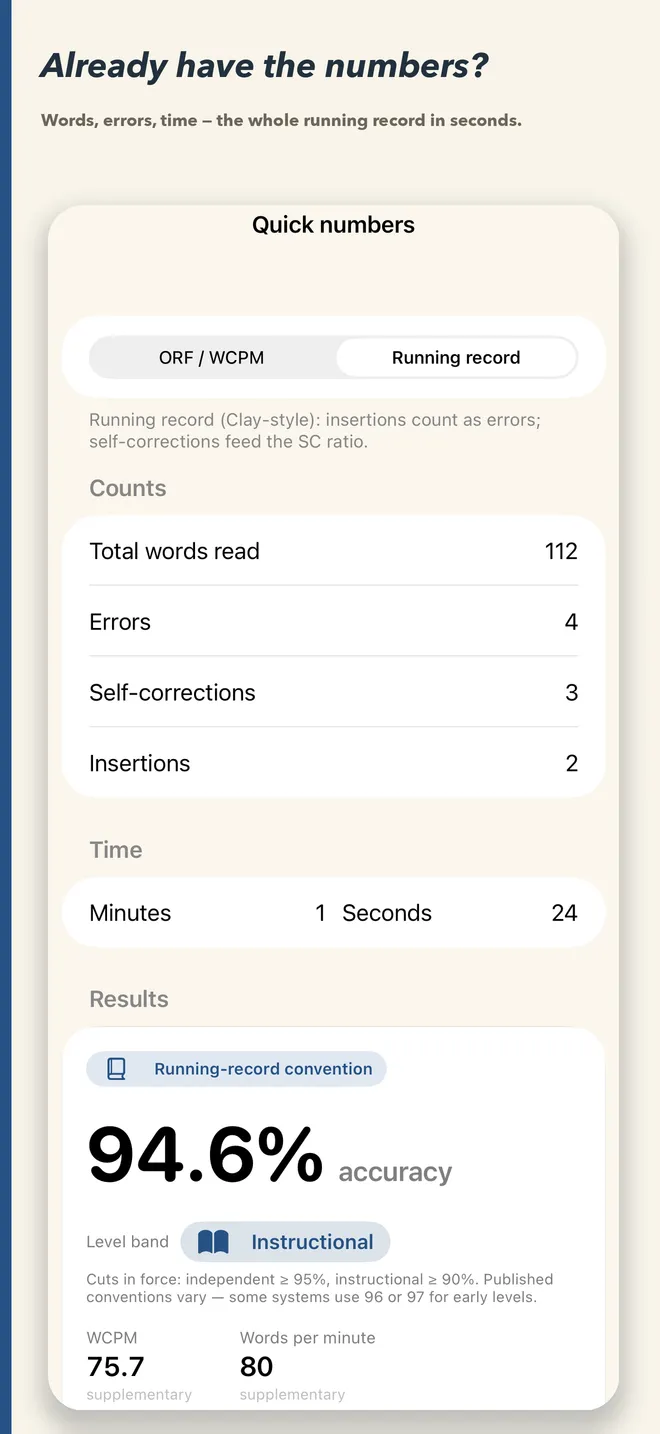
If you already have totals on paper, enter them directly instead of recreating every word-level mark.
Show how the score was made
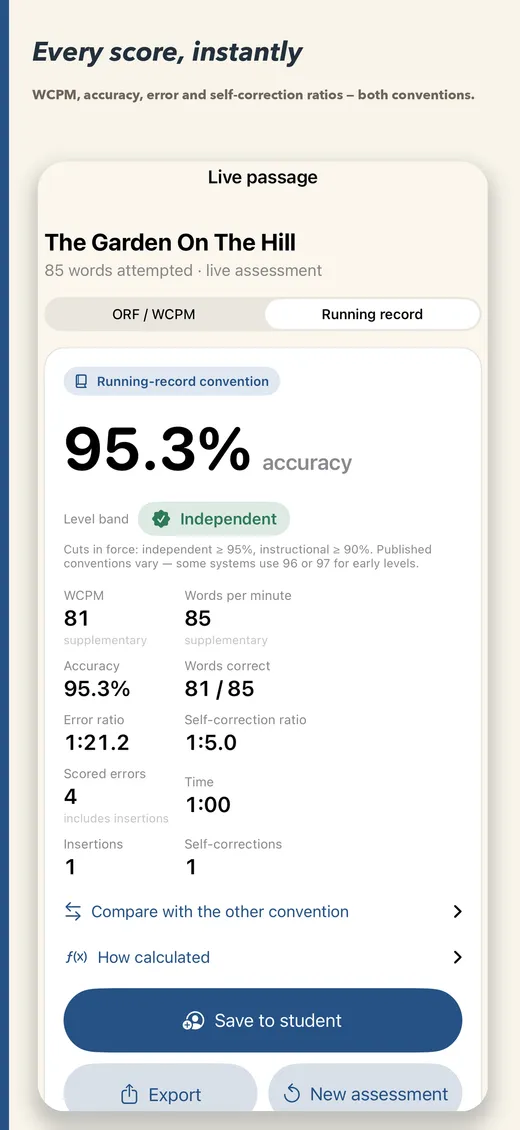
WCPM and accuracy should remain connected to words attempted, scored errors, and exact elapsed time.
Separate ORF from running record rules
The app should state how insertions and self-corrections are handled rather than silently mixing methods.
Keep comparable checks together
Save the date, passage, convention, raw counts, scores, notes, and any educator-entered target with the student.
Make records usable elsewhere
PDF and CSV output should help with documentation, team review, parent communication, or transfer to the system your school uses.
02 / Choose the right entry path
Live assessment when you have the text, quick calculation when you have the totals
Live passage workflow
- Add a passage you are allowed to use by typing, pasting, scanning on device, or choosing it from your library.
- Select the scoring convention before the read.
- Start the timer and tap words to mark errors or self-corrections.
- Record insertions and set the last word attempted.
- Review the automatically calculated results and save the assessment.
Quick entry workflow
- Select ORF/WCPM or running-record scoring.
- Enter words attempted, errors, self-corrections, insertions, and exact time.
- Add your own WCPM target when appropriate.
- Open “How calculated” to verify the arithmetic.
- Save the result or export a report when needed.
03 / Keep enough context
A useful score record can be understood later
Saving only “92 WCPM” removes the information needed to interpret or reproduce the score. Keep the raw words, error count, self-corrections, insertions when relevant, elapsed time, passage title, date, convention, benchmark source, and notes.
Calculation evidence
Words attempted, scored errors, correct words, time, and the exact formula.
Assessment context
Passage, date, purpose, administration conditions, and scoring convention.
Instructional evidence
Comprehension, prosody, observed word-reading patterns, and planned next steps.
Progress evidence
Comparable prior checks, educator-entered target, trend, and response to instruction.
A running record tool should organize these inputs without making a diagnostic claim. The teacher decides whether the sample is comparable, which evidence matters, and what instruction should follow.
Built around the teacher’s choice
FluencyCalc supports both workflows and keeps them labeled
Use the live passage screen when you want to tap miscues as the student reads. Use quick entry when the assessment is already on paper. The app calculates WCPM, accuracy, error ratio, and self-correction ratio and keeps ORF and running-record conventions separate.
- iPhone and iPad
- Works completely offline
- Student history and charts
- PDF and CSV exports
Running record and oral reading fluency tools for educators
04 / Keep the system connected
Continue with a focused teacher guide
Frequently asked questions
Running record app FAQ
What should a running record app calculate?
At minimum, it should preserve words attempted, scored errors, self-corrections, time, accuracy, and the scoring convention. Many teachers also need WCPM, error ratio, self-correction ratio, notes, history, and exports.
Can FluencyCalc mark errors during a live read?
Yes. You can place a passage in the app, start the timer, tap words to mark errors and self-corrections, undo marks, record insertions, and identify the last word read.
Can I enter numbers from a paper running record?
Yes. Quick entry accepts words, errors, self-corrections, insertions, and time, then displays the calculated metrics and the arithmetic used.
Does FluencyCalc include copyrighted assessment passages?
No. Teachers bring passages they have the right to use by typing, pasting, scanning on device, or choosing from their own saved library.
Where does FluencyCalc store student information?
The app works offline without accounts, advertising, analytics, or network calls. Student labels, passages, and scores remain on the device unless the educator explicitly shares an export.
FluencyCalc is a calculation and record-keeping tool. Educators remain responsible for passage rights, administration, scoring definitions, benchmark sources, data policies, and instructional interpretation.