
AI answers on Apple Watch
AI4Watch
AI answers on your Apple Watch in one tap
AI4Watch is for Apple Watch; there is no Android version.
Or scan with your phone’s camera.
 Apple Watch
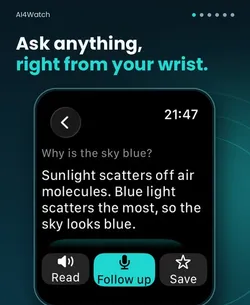
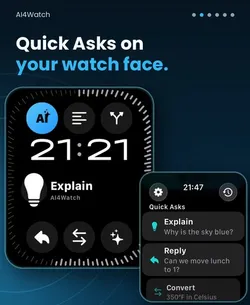
AI4Watch is an AI chat app that runs on Apple Watch itself. Raise your wrist, tap a Quick Ask or the watch-face complication, speak or scribble a question and read a short answer sized for the screen, then hear it aloud or ask for more. It works on Wi-Fi or cellular without the phone, with no account.
- Apple Watch app
- Works without the phone nearby
- No account
- Dictation, handwriting, keyboard
- Answers in your language
What you can do with AI4Watch
Your Quick Asks, one tap from the watch face
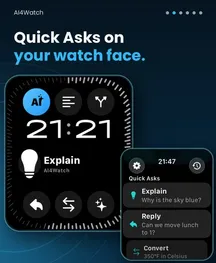
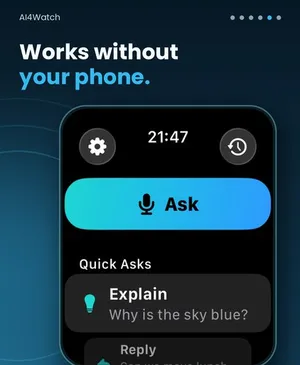
Explain, Reply, Convert, Sum Up, Decide and Ideas start with a single tap, and you can write Quick Asks of your own for the things you ask every day: up to twelve in all. Put Ask or any Quick Ask on the watch face as a complication.
- “350°F in Celsius” or “Can we move lunch to 1?” without typing a prompt
- Pin your favourite Quick Ask to the watch face
Short first, then as much as you need
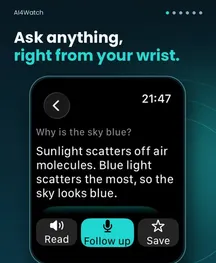
Every answer is written for a watch screen: a few sentences, not a wall of text. Tap Tell me more for a longer answer, or follow up with a suggestion or your own question; AI4Watch remembers the topic, so “why?” and “make it shorter” just work.
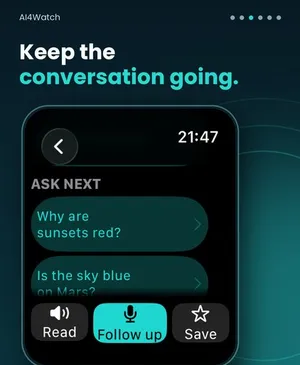
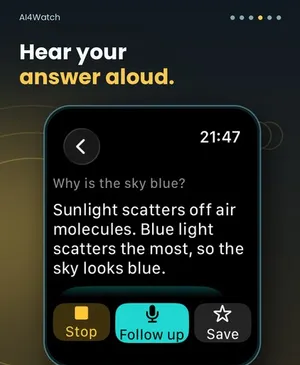
Hear the answer while your hands are busy
Turn on automatic read-aloud and every answer is spoken as it arrives, in a voice that matches its language. Handy while cooking, walking the dog or halfway through a run.
Every answer kept for later
Your history keeps the questions you asked and their answers, and Save marks the ones you want to find again. It stays on your watch.
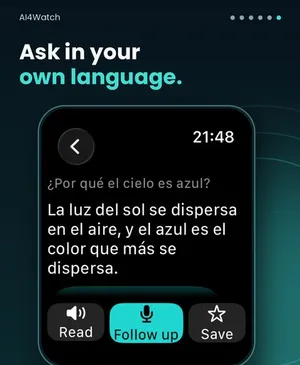
Ask in your own language
Ask in any language and the answer comes back in the same one. Speak, write letters with your finger or use the keyboard. The app itself runs in English, Spanish, Portuguese and Chinese.
No phone in your pocket needed
AI4Watch is an Apple Watch app with no phone app. When the watch has Wi-Fi or cellular, it answers on a run, at the gym or anywhere the phone stayed at home.
Everything in the app
Ask
- Tap Ask and speak, write with your finger or use the keyboard
- Six built-in Quick Asks: Explain, Reply, Convert, Sum Up, Decide and Ideas
- Quick Asks of your own, up to twelve in all
- Ask and Quick Ask complications for the watch face
Read, listen and go further
- Short answers sized for the watch screen
- Tell me more for a longer answer
- Suggested follow-ups that remember the topic, or your own follow-up question
- Read aloud on demand or automatically, in a voice that matches the answer’s language
Keep and choose
- History of your questions and answers, with saved favourites
- Answers in the language you ask in; app in English, Spanish, Portuguese, Simplified and Traditional Chinese
- Voice setting: match the answer or a voice you pick
Who is it for?
- Apple Watch owners who want a quick answer without taking out the phone
- Runners, cyclists and gym-goers who leave the phone at home and have a cellular watch
- Cooks, parents and anyone with busy hands who would rather hear the answer
- People who ask the same kinds of things every day: conversions, quick replies, short explanations
What makes it different?
Made for the watch, not shrunk from the phone
There is no phone app to open first. Answers are a few sentences long so they can be read at a glance, with longer answers one tap away.
One tap instead of a prompt
Quick Asks and complications turn the questions you ask most into a single tap from the watch face.
Away from the phone
With Wi-Fi or cellular on the watch, AI4Watch answers when the phone is at home.
No account, no advertising
There is no sign-up and no advertising, and no tracking. Your history and Quick Asks stay on the watch; questions travel over an encrypted connection only to get your answer.
Free tools and guides
Requirements
- Device
- Apple Watch Series 4 or later
- watchOS
- watchOS 10.6 or later
- Internet
- Wi-Fi or cellular on the watch, or through the paired phone
- Input
- Dictation, handwriting and keyboard (where the watch and language support it)
- App languages
- English, Spanish, Portuguese, Simplified Chinese, Traditional Chinese
- Age
- 13 and older
- Current version
- 2.0.1 · October 28, 2026
Neobile LLC · watchOS 10.6 or later
AI4Watch is an independent product of Neobile LLC, for people 13 and older. AI answers can be wrong or out of date; check anything important. Apple Watch and watchOS are trademarks of Apple Inc.; ChatGPT is a trademark of OpenAI. Neither is affiliated with this app.
Questions people ask
Do I need my phone nearby?
No. AI4Watch runs on the watch itself. It needs an internet connection, which the watch gets from Wi-Fi, its own cellular plan or the paired phone, because the answer is written by an AI service in the cloud.
Which Apple Watch models does it work on?
Apple Watch Series 4 and later with watchOS 10.6 or later, including SE and Ultra models. You install it from the App Store on the watch or from this page.
Is AI4Watch ChatGPT?
No. AI4Watch is an independent app from Neobile LLC and is not affiliated with OpenAI. Its in-app notice explains which AI service writes the answer before you ask your first question.
Can I get a longer answer?
Yes. Answers start short so they fit the screen. Tap Tell me more for a longer one, or ask a follow-up; the app remembers the topic of the conversation.
Can it read answers aloud?
Yes. Tap Read to hear an answer, or turn on automatic read-aloud so every answer is spoken as it arrives. The voice matches the language of the answer unless you pick one in Settings.
What can I put on my watch face?
An Ask complication that opens straight to the question prompt, any built-in Quick Ask, or the Quick Ask you pinned. Touch and hold the watch face, tap Edit and choose AI4Watch in a complication slot.
Is there an account, and what is sent?
There is no account and no advertising. Your question travels over an encrypted connection only to get the answer; your history and Quick Asks stay on the watch. Keep passwords, health details and other sensitive information out of any chatbot.


