Printable · one page · US Letter
Free printable sermon notes template (PDF)
Download a free one-page sermon notes template with space for the date, speaker, passage, the big idea, four main points, Scripture references, what stayed with you, questions, this week’s application and a prayer. Print it once a week, fill it in during the message, and finish it the same day.
Download the template
One page, black and purple on white, designed to stay readable when photocopied in grayscale. Big boxes where most of the writing happens; small ones for details you jot down in seconds.
Download the PDFTwo-language version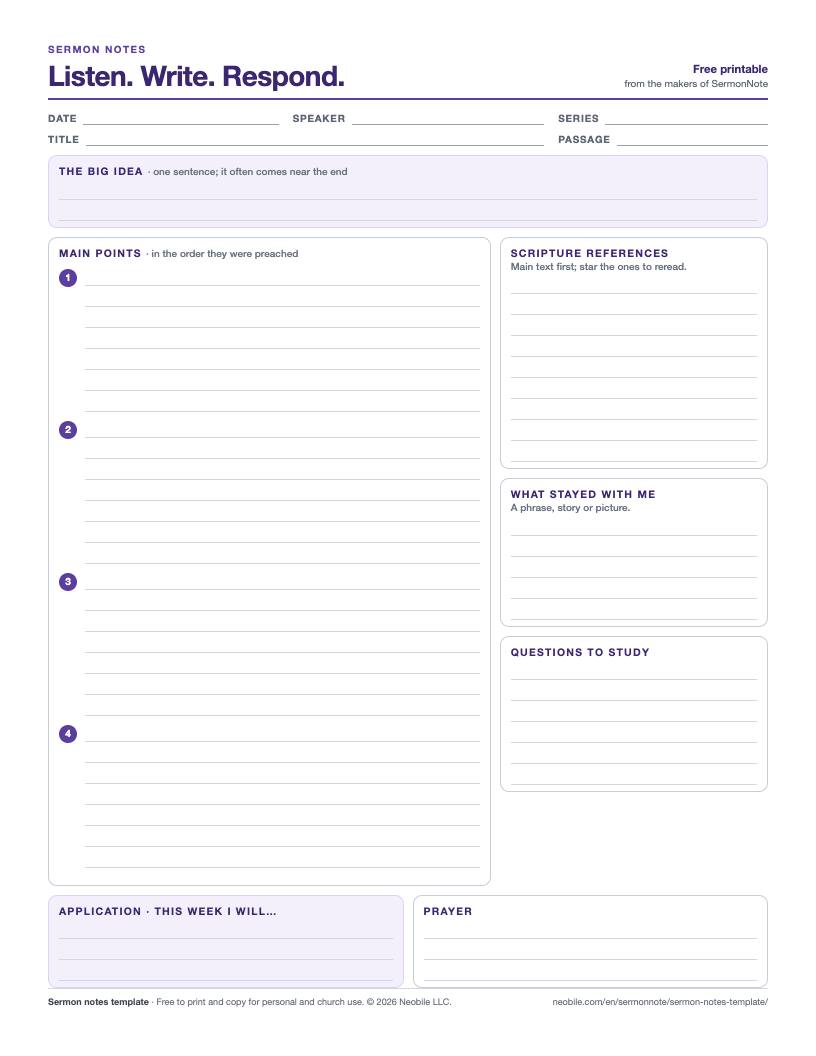
What is on the sermon notes template?
Each box answers one question you will want answered when you look back at these notes in a month. The order follows the way most sermons unfold, so your pen moves down the page as the preacher moves through the message.
- Date, speaker, series, title and passage. Fill these in before the service begins. They take seconds and make a stack of sheets easy to sort later.
- The big idea. A single sentence for the whole message. It is printed at the top on purpose but usually written last.
- Main points. Four numbered spaces, each with room for the point itself and a line or two of explanation, an example, or a cross-reference.
- Scripture references. Every passage the preacher mentions, the main text first. Put a star next to any you want to reread in context.
- What stayed with me. A phrase, story or picture. It often becomes the handle you remember the sermon by.
- Questions to study. Anything that puzzled you, to look up later or bring to your small group.
- Application. One concrete “This week I will…” sentence, small enough to actually do.
- Prayer. A few words of response: thanks, confession or a request that grew out of the message.
How do I fill it in during the sermon?
Write fragments, not sentences. “God runs to the son → before the speech” is enough for a main point while the preacher is still talking; you can turn it into a sentence afterward. Listen for signal words like “first,” “second” or a repeated question, because that is usually where a new main point starts. When a verse reference goes by too fast, write only the book and chapter and look up the verse number later.
Leave the big idea, application and prayer boxes empty while the message is going on unless something lands clearly. Preachers often restate their central claim and give a specific call to respond in the final minutes, and those last few minutes fill the three boxes better than any guess made earlier.
What does a filled-in sheet look like?
Passage and titleLuke 15:11–32 · “The father runs”
Big ideaThe father welcomes the one who comes home before he can finish apologizing.
Main points1. The father is watching · 2. The father runs · 3. The father restores and invites
ScriptureLuke 15:1–2, Luke 15:20, Romans 5:8 ★
This week I will…Call my brother before Sunday.
This sample is short on purpose: five lines like these are enough to bring a whole sermon back to mind weeks later. The questions box might hold “Why does the older brother stay outside?” for the small group.
What should I do with my notes after Sunday?
Give the sheet ten minutes the same afternoon. Reread the main passage, write the big idea if it is still blank, and make the application specific enough that you will know on Thursday whether you did it. Keep the sheets in a folder or a binder by date; after a few months, the series and passage fields let you find any message again in a minute. If you lead a group, the questions box and the starred references are a ready-made start for discussion.
Is there a faster way than writing it all by hand?
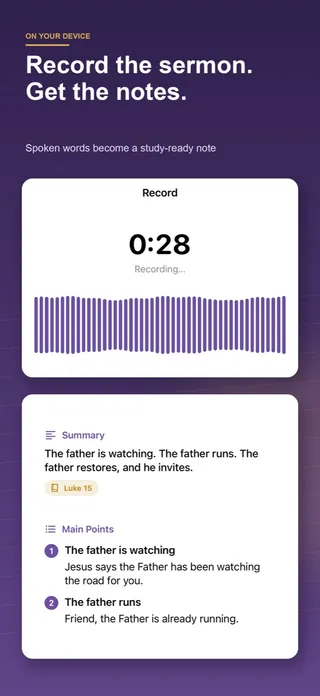
Paper is quiet and helps many people remember. If writing keeps pulling your attention away from the preacher, SermonNote records the sermon on your phone, shows a live transcript and turns it into notes with the same shape as this sheet: the summary, the main points, applications and the Scripture references, each one a tap away from the passage in a built-in Bible. Your first sermon is fully free, and nothing is uploaded; everything runs on the device. Follow your church’s recording policy before you press record.
Questions people ask
Is the sermon notes template really free to print?
Yes. Download the PDF and print or photocopy as many as you like for yourself, a small group or a whole congregation. It needs no sign-up and carries no advertising; the only branding is a one-line footer.
Will it print on A4 paper?
The file is US Letter. On A4, choose “Fit to page” or “Scale to fit” in the print dialog; the layout keeps its proportions and every line stays usable.
What goes in “the big idea” box?
One sentence that sums up the whole message, in your own words. Many people only manage it near the end of the sermon or on the way home, which is why the box sits at the top but is meant to be filled last.
How many main points should I expect?
Most sermons have two to four. The template gives four numbered spaces with seven lines each; if a preacher uses more, continue in the margin or on the back.
Can church staff hand this out in the bulletin?
Yes. It works as a weekly insert next to fill-in-the-blank notes, or on its own for churches that do not print an outline. Please keep the footer so people can find the file again.
Is there a version for two languages?
Yes. A second free sheet has two columns, one for the language of the sermon and one for your own, plus a row for Bible book names in both. It comes with our guide to taking sermon notes in two languages.